# Autumn — Full AI Corpus
> Drop-in, open-source billing infrastructure for AI startups, built on top of Stripe.
## What Autumn is
- Autumn is open-source billing infrastructure that runs on top of Stripe.
- It is the system of record for subscriptions, usage metering, credits, and feature entitlements, exposed through a small API (`attach`, `check`, `track`).
## What Autumn is not
- Autumn is not a payment processor and does not replace Stripe; Stripe still holds the subscription and processes payments.
- Autumn is not a pure usage-metering tool — it also enforces entitlements and feature access, not just end-of-month invoicing.
## Key links
- Autumn docs: https://docs.useautumn.com/welcome
- Quickstart: https://docs.useautumn.com/quickstart
- API reference: https://docs.useautumn.com/api-reference
- Website: https://useautumn.com
- Blog: https://useautumn.com/blog
- GitHub: https://github.com/useautumn/autumn
---
# Autumn vs Building In-House
> Building billing in-house starts simple. Keeping it correct as pricing changes is the hard part.
## Short Answer
If your billing model is simple, building in-house can work. You can create a few tables for plans, credits, usage, and entitlements, then wire them into Stripe and your application.
The problem is that billing rarely stays simple. Pricing changes. Credits roll over. Some balances reset monthly, others never expire. Enterprise customers need custom packages. Usage limits become product behavior. Eventually, the "simple billing table" becomes a system with a counter, a ledger, reset jobs, analytics pipelines, migration logic, and Stripe sync.
Autumn is for teams that want that application billing state managed from the beginning: real-time checks, credits, entitlements, limits, usage, rollovers, reset behavior, custom packages, ledgers, and Stripe sync.
## When Autumn Fits
- Your pricing is based on credits, seats, usage limits, feature tiers, or hybrid packages.
- You need low-latency `check()` calls and reliable `track()` writes.
- You iterate on pricing often, or billing work is blocking your team.
- You support both self-serve and custom enterprise packages.
- You do not want billing logic scattered across tables, webhooks, cron jobs, queues, analytics jobs, and product code.
## When Building In-House Fits
- You need full control over the billing data model.
- You have very custom analytics, reporting, or data warehouse needs.
- You have a team that wants to own billing as core infrastructure.
- You generally prefer building critical systems yourself instead of outsourcing them.
## What Usually Gets Hard
The first version is usually manageable. The later versions are where the work compounds:
- Modeling credits as rows, not columns, once you add top-ups, coupons, expirations, and rollovers.
- Keeping a fast counter for real-time checks and a durable ledger for auditability.
- Handling monthly, annual, lifetime, and custom reset schedules without double-granting credits.
- Choosing deterministic deduction order across paid credits, free credits, expiring credits, and recurring grants.
- Scaling concurrent deductions without locking your primary database on every request.
- Building analytics over usage and credit events without making the analytics store your source of truth.
- Supporting custom enterprise contracts, one-off grants, pricing migrations, and Stripe sync.
Larger companies often have teams dedicated to this work. For most startups, that is not the highest-leverage place to spend engineering time.
For a deeper breakdown of why this becomes hard, read [Stop rebuilding your billing system](/blog/stop-rebuilding-billing). It covers the flexibility problems that show up once plans, entitlements, custom packages, and pricing changes start interacting.
OpenAI described a similar shift when scaling Codex and Sora: asynchronous usage billing was not enough for real-time access decisions, so they built a system that combines limits, usage tracking, and credits in one evaluation path.
## Implementation Model
With an in-house system, the typical model is:
```text
Your DB -> plans / credits / usage / limits / entitlements
Your app -> custom checks / usage writes / deduction logic
Your jobs -> resets / rollovers / migrations / analytics / Stripe sync
```
With Autumn, the typical model is:
```text
Autumn -> plans / credits / usage / limits / entitlements / ledgers
Your app -> Autumn check() / track()
Autumn -> Stripe -> subscriptions / invoices / payments
```
## Bottom Line
Building in-house gives you maximum control over the data model and analytics. Autumn gives you a maintained billing-state layer so your team can spend less time rebuilding counters, ledgers, credits, entitlements, limits, rollovers, reset logic, and pricing migrations.
If billing is not your product, Autumn is usually the better default.
## Sources
- Autumn: [overview](https://docs.useautumn.com/welcome), [checking access](https://docs.useautumn.com/documentation/customers/check)
- External: [OpenAI on real-time access, limits, and credits](https://openai.com/index/beyond-rate-limits/), [OpenMeter on credit systems](https://openmeter.io/blog/credit-systems-are-challenging), [Stripe on credit-based subscription models](https://stripe.com/resources/more/what-is-a-credits-based-subscription-model-and-how-does-it-work)
- Related: [Stop rebuilding your billing system](/blog/stop-rebuilding-billing), [We built a billing company but didn't replace Stripe Billing](/blog/we-built-a-billing-company-but-didnt-replace-stripe-billing)
## Last Updated
2026-06-22
---
# Autumn vs Metronome
> Metronome works best when billing starts from usage data. Autumn works best when product access starts from billing state.
## Short Answer
Metronome is a strong fit for companies with complex usage streams, billable metrics, and finance-led invoicing workflows. If you are doing pure usage-based billing, such as charging per hour of compute, storage consumed, or multi-dimensional usage metrics, Metronome is built for that world.
Autumn is a better fit when billing state needs to be enforced inside the product in real time: credits, committed spend, rollovers, reset intervals, usage limits, alerts, plan changes, add-ons, entitlements, enterprise contracts, and custom sales-led deals. In that model, Stripe remains the payment and invoice layer while Autumn owns the product-facing billing state.
## When Autumn Fits
- You sell credits, allowances, feature access, or hybrid subscription plus usage plans.
- You need to check access before a user action, then record usage after it happens.
- You want credits, entitlements, subscriptions, usage limits, and feature gating in one system.
- You are PLG, sales-led, or hybrid, and deal with custom enterprise packages.
- You need custom enterprise contracts, committed spend, or negotiated credit grants to map directly to product access.
- You iterate on pricing often and do not want each change to become a billing rewrite.
- You want Stripe to remain the payment and invoice system, while Autumn owns the product-facing billing logic.
## When Metronome Fits
- Your hardest problem is turning large usage streams into invoice line items.
- You need complex billable metrics over raw events, such as custom aggregations or multi-dimensional rating.
- Your billing motion is primarily infrastructure-style usage rating and invoice generation.
- You have, or prefer to own, entitlement checks, product gating, and access control in your application.
- You want a dedicated usage rating and invoicing layer for sophisticated contracts.
## Product Difference
Metronome starts from usage events. You define billable metrics, products, rate cards, contracts, credits, commits, and invoice behavior. It can also send webhook notifications when spend, usage, or credit thresholds are reached. That is powerful when billing depends on complex event aggregation, alerting, and contract terms.
Autumn starts from the customer's billing state. A customer has plans, balances, entitlements, credit systems, limits, and Stripe subscriptions. Your app can call `check()` before allowing access and `track()` after usage. That makes Autumn a better fit when billing needs to sit directly in the product path.
## Credits and Usage Limits
Both products can support credit-based models, but they optimize for different workflows.
Metronome credits and commits are tied into contracts, usage rating, and invoices. This is useful when the hard part is applying contract terms to large volumes of usage data and turning the result into invoices.
Autumn credits and commits are designed as product state. They can gate access, reset on different intervals, roll over, power usage alerts, support customer-specific enterprise grants, model committed spend, and work alongside entitlements. This is the pattern many AI products need: before an AI message, agent run, API call, or premium action, the app needs to know whether the customer is allowed to proceed.
## Enterprise and PLG
Autumn is designed for teams that sell through both self-serve and sales-led motions.
The same billing model can power checkout, credits, and paywalls for self-serve users, while also supporting custom plans, credit grants, reset behavior, committed spend, and negotiated enterprise terms. That matters when pricing changes often: you can adapt packages without splitting PLG and enterprise customers into separate billing systems.
Metronome's enterprise strength is different: sophisticated usage rating, invoice workflows, and finance operations over high-volume usage data.
## Implementation Model
With Metronome, the typical model is:
```text
Application -> usage events -> Metronome -> rated usage / invoices
Metronome -> alerts / webhooks / APIs -> application policy
```
With Autumn, the typical model is:
```text
Application -> Autumn check() -> allow or block access
Application -> Autumn track() -> update usage and balances
Autumn -> Stripe -> subscriptions, invoices, and payments
```
The difference is not whether either system is real time. The difference is where the access decision lives. Metronome gives your application billing signals through alerts, webhooks, and APIs. Autumn combines the billing state and product policy behind a synchronous `check()` API.
## Sources
- Autumn: [overview](https://docs.useautumn.com/welcome), [checking access](https://docs.useautumn.com/documentation/customers/check), [credit systems](https://docs.useautumn.com/documentation/modelling-pricing/credit-systems)
- Metronome: [overview](https://docs.metronome.com/guides/get-started/how-metronome-works), [notifications](https://docs.metronome.com/guides/customers-billing/set-up-notifications/create-and-manage-notifications), [credits and commits](https://docs.metronome.com/guides/pricing-packaging/apply-credits-and-commits/create-a-pre-paid-commit), [billable metrics](https://docs.metronome.com/guides/implement-metronome/core-concepts/create-billable-metrics)
## Last Updated
2026-06-22
---
# Autumn vs Orb
> Orb works best when billing starts from event data and pricing analysis. Autumn works best when your application needs billing state it can read and update in real time.
## Short Answer
Orb is a strong fit for companies with event-heavy usage billing, complex billable metrics, pricing simulations, credit ledgers, invoice workflows, and revenue reporting. If your hardest problem is turning raw usage events into accurate billing across changing pricing models, Orb is built for that world.
Autumn is a better fit when your application needs to manage billing state directly: credits, limits, entitlements, rollovers, reset intervals, feature access, custom packages, committed spend, and plan changes. Your app calls `check()` when it needs the current state and `track()` when usage happens, while Autumn keeps the customer billing state up to date.
## When To Use Autumn
- You need a synchronous `check()` before allowing a customer to use a feature or consume credits.
- You sell credits, allowances, feature access, or hybrid subscription plus usage plans.
- You want credits, limits, entitlements, reset schedules, rollovers, and customer package rules in one application-facing state layer.
- You are PLG, sales-led, or hybrid, and deal with custom enterprise packages.
- You iterate on pricing often and want those changes to show up in product behavior, not only invoices.
## When Orb Fits
- Your billing model starts from raw usage events.
- You need complex queries over usage data, dimensional pricing, or SQL-like metric analysis.
- You want a detailed prepaid credit ledger with strong auditability and revenue workflows.
- You need to simulate pricing changes against historical usage before rolling them out.
- You want a dedicated usage-based billing platform for pricing, subscriptions, invoices, credits, and enterprise contracts.
## Product Difference
Orb starts from usage data. You send events into Orb, define billable metrics over those events, configure pricing and plans, then Orb turns that into invoices, credit drawdowns, alerts, simulations, and reporting.
Autumn starts from the billing state your application needs at runtime. A customer has a plan, balances, limits, entitlements, reset schedules, rollover rules, add-ons, and custom terms. Your app reads that state through `check()` and updates it through `track()`.
Both approaches are valid. The difference is where the billing system needs to be most useful: in usage-query, ledger, and invoicing workflows, or in the application state that controls credits, limits, entitlements, and package behavior.
## Credits and Billing State
Orb supports prepaid credits, credit ledgers, balance alerts, and product access workflows based on prepaid balances. It is not just a metering tool.
The distinction is the integration model. Orb's documented product-access pattern uses credit balances, alerts, webhooks, and application-side policy. Autumn's state model is synchronous: call `check()` to read current credit, limit, and entitlement state, call `track()` to record usage, and keep reset behavior, rollovers, package rules, and usage history in the same system.
Autumn also keeps event and usage history for billing state changes. The difference is emphasis: Orb's ledger and query tools are built for deep usage analysis, invoice calculation, and revenue workflows; Autumn's event history supports real-time application billing state.
## Pricing Changes
Both Orb and Autumn are useful when pricing changes often, but they optimize for different parts of the change.
Orb has strong tools for usage-pricing iteration: versioned plans, migration previews, simulations, and metrics that can be recalculated from historical usage. This is useful when a pricing change depends on how usage events are queried, grouped, rated, and displayed on invoices.
Autumn focuses on pricing changes that alter application billing state: which plan a customer is on, how many credits they get, what resets monthly, what resets on another interval, what rolls over, which features unlock, and what custom enterprise terms apply. This is useful when a pricing change needs to show up in the product as soon as the customer uses it.
## Implementation Model
With Orb, the typical model is:
```text
Application -> usage events -> Orb
Orb -> metrics / pricing / credit ledger / invoices / alerts
Your app -> Orb alerts + APIs -> product policy
```
With Autumn, the typical model is:
```text
Autumn -> plans / credits / usage / limits / entitlements / reset rules
Your app -> Autumn check() / track() -> billing state reads and writes
Autumn -> billing provider -> subscriptions / invoices / payments
```
## Sources
- Autumn: [overview](https://docs.useautumn.com/welcome), [checking access](https://docs.useautumn.com/documentation/customers/check), [credit systems](https://docs.useautumn.com/documentation/modelling-pricing/credit-systems)
- Orb: [what is Orb](https://docs.withorb.com/introduction), [prepaid credits](https://docs.withorb.com/product-catalog/prepurchase), [product access](https://docs.withorb.com/self-serve/product-access), [price changes](https://docs.withorb.com/product-catalog/price-changes), [dimensional pricing](https://docs.withorb.com/product-catalog/dimensional-pricing)
## Last Updated
2026-06-22
---
# Autumn vs Stripe Billing
> Stripe Billing is the billing and payments foundation. Autumn is the product-facing billing state layer built on top of Stripe.
## Short Answer
Autumn and Stripe Billing are not mutually exclusive. Autumn uses Stripe underneath, so subscriptions, invoices, payments, taxes, and payment methods still live in Stripe.
The difference is not that one replaces the other. Stripe remains the underlying system for subscriptions, invoices, payments, and native billing workflows. Autumn is the layer your application talks to when those Stripe-backed plans need to drive product behavior: "can this customer do this right now?" across credits, limits, entitlements, custom packages, and usage-based plans.
For a more detailed narrative view, read [We built a billing company but didn't replace Stripe Billing](/blog/we-built-a-billing-company-but-didnt-replace-stripe-billing).
## When To Add Autumn To Stripe
- You already use Stripe, but your app needs product-facing billing state.
- You sell credits, allowances, seats, feature access, or hybrid subscription plus usage plans.
- You need `check()` before a user action and `track()` after usage happens.
- You are PLG, sales-led, or hybrid, and deal with custom enterprise packages.
- You iterate on pricing often and want plan changes to map cleanly to Stripe.
## When Stripe Billing Alone May Be Enough
- You mostly need subscriptions, invoices, checkout, tax, and payment collection.
- Your feature access and entitlements are simple enough to model directly from Stripe products.
- You do not need complex credit behavior like rollovers, monthly versus lifetime balances, or product-level usage limits.
- You want to build and manage the billing-state layer yourself instead of outsourcing that logic.
## How Autumn Uses Stripe
Autumn does not replace Stripe Billing. It sits between your application and Stripe.
You define the package your customer should have in Autumn: plan, credits, limits, entitlements, add-ons, custom enterprise terms, and reset behavior. Autumn maps the payment-facing parts of that package to Stripe, so Stripe still handles subscriptions, invoices, payments, taxes, and payment methods.
Your application then talks to Autumn at runtime. `check()` answers whether the customer can use a feature or consume credits, and `track()` records usage. Stripe remains the billing and payment system; Autumn keeps the product-facing billing logic in sync with it.
## Usage-Based Billing
Stripe's usage-based billing docs now point advanced usage-based billing to Metronome, a Stripe product for real-time metering, pricing, billing, and reporting. If your main problem is pure usage rating, large-scale metering, or invoice generation from complex usage data, see [Autumn vs Metronome](/alog/autumn-vs-metronome).
Autumn is different from both Stripe Billing and Metronome because it focuses on the product path: checking access, updating credit balances, enforcing limits, and keeping that state aligned with Stripe. This is the layer described in [We built a billing company but didn't replace Stripe Billing](/blog/we-built-a-billing-company-but-didnt-replace-stripe-billing).
## Implementation Model
With Stripe Billing alone, the typical model is:
```text
Stripe -> subscriptions / invoices / payments
Your DB -> plans / credits / usage / rate limits / entitlements
Your app -> Stripe webhooks + your DB -> product access
```
With Autumn and Stripe, the typical model is:
```text
Autumn -> plans / credits / usage / rate limits / entitlements
Your app -> Autumn check() / track() -> product access and usage
Autumn -> Stripe -> subscriptions / invoices / payments
```
## Sources
- Autumn: [overview](https://docs.useautumn.com/welcome), [checking access](https://docs.useautumn.com/documentation/customers/check), [Autumn and Stripe](https://useautumn.com/blog/we-built-a-billing-company-but-didnt-replace-stripe-billing)
- Stripe: [Billing](https://stripe.com/billing), [Entitlements](https://docs.stripe.com/billing/entitlements), [usage-based billing](https://docs.stripe.com/billing/usage-based), [Metronome with Stripe](https://docs.stripe.com/billing/how-metronome-works-with-stripe)
## Last Updated
2026-06-22
---
# How to build a credit ledger that scales
## Introduction
When we think about charging for AI applications and agents, we default to "usage-based billing".
And while it's clear that tokens should be monetized this way, the infrastructure people are actually building to support this looks completely different from the existing systems that phrase was coined for.
Existing billing services assumed that billing was asynchronous. You send events that are tallied up and added to the end of a monthly invoice. This worked well for compute and infrastructure.
The most common form of AI billing, however, is "quota-based": a form of usage-billing where synchronous access decision needs to be made in every request path before tokens are spent. This is the business model behind growing companies like Cursor, Lovable and OpenAI (you can even read about Codex's billing architecture in [this blog](https://openai.com/index/beyond-rate-limits/) by Jonah Cohen).
Customers buy some amount of usage **upfront** (usually in the form of credits), use them up, then **hit a hard limit**. These limits are a piece of state in constant flux: plan changes, billing cycles, user controls, promotional grants and other business logic.
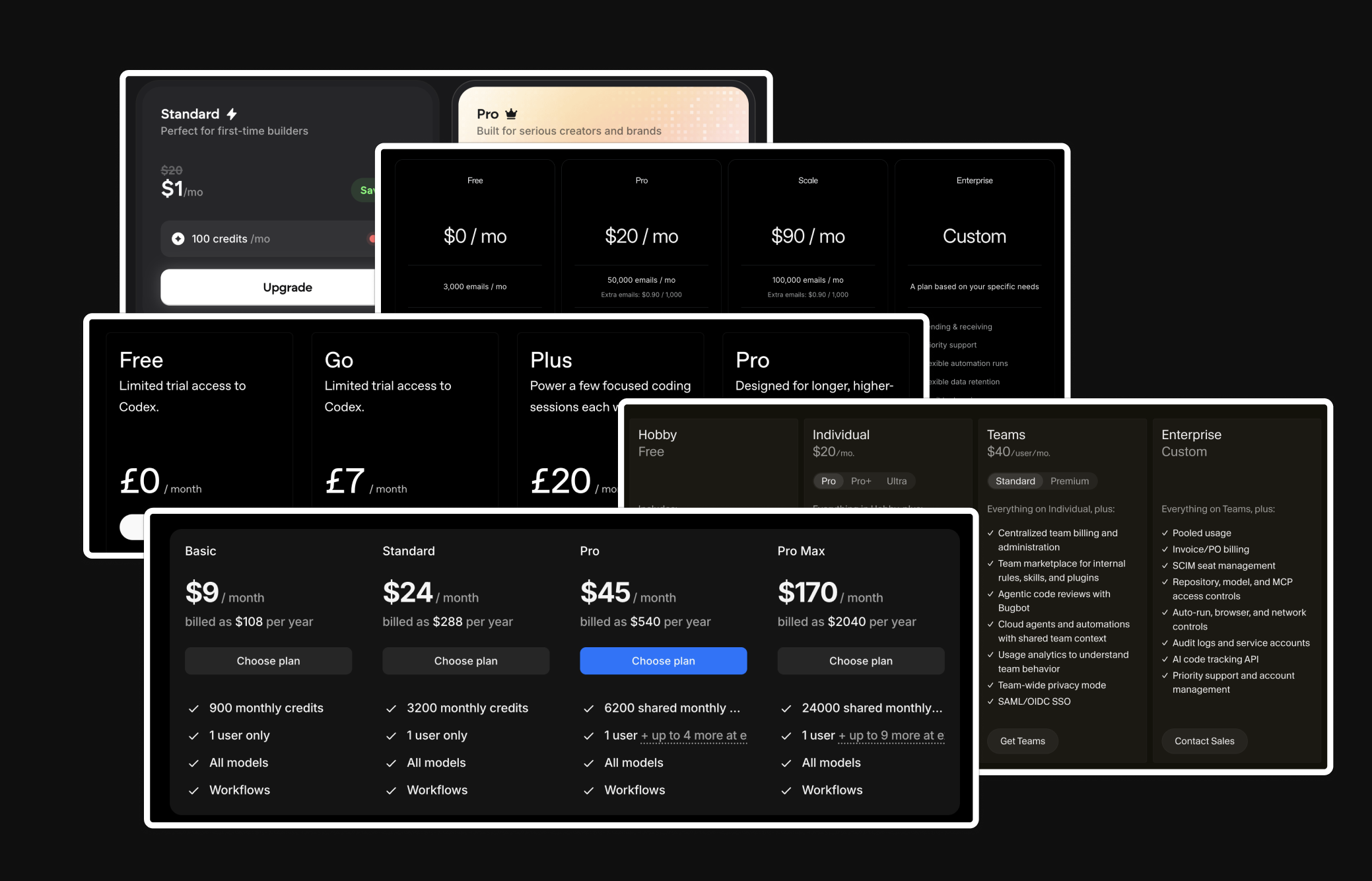
## What do you need?
The infrastructure behind our billing has to satisfy three conditions at once: low-latency access decisions on whether a customer can do something (ie, use a credit), a provably correct and auditable record of their usage, and with all of it working under high throughput (millions to billions of monthly events) and concurrency.
This article is aimed at AI companies on their second or third rewrite of billing. We will cover:
* Understanding the counter and ledger, and why you need both
* Using a cache to keep access decisions fast
* Tracking usage under load, and why synchronous deduction is needed
* Handling resets, expiry, and usage analytics
Since credits are the most common way of billing for AI tokens, we'll use this as the example going forward. However, the principles apply to any model where quotas are enforced.
## Real-time access decisions
A reasonable first approach would be to ask: can't we just aggregate over all a user's usage events to see if someone has remaining credits when checking a request?
This doesn't work for real-time enforcement (we've seen it tried!). Different plans have different limits, rollover logic, expirations. The query becomes complex, slow, and very hard to debug or iterate on.
The solution is the counter: typically a static value for the remaining balance of credits or usage, and when that's positive (with some nuance for cases like overages) the action is allowed.
#### The counter
The first thing to consider is your data model for credits and balances. Imagine you have a plan which offers 100 credits every month. You would probably start with a schema that looks like this:
Now what happens if you want to add single-purchase top ups? You might think to add another **column** `topup_balance` to your table.
This works for exactly one new credit type. The moment a bucket needs rules of its own; top-ups that expire after 6 months, promotional credits, 3-month rollovers, a daily refresh, a single number stops being enough. Each bucket has its own balance, deduction rules, reset cycles and expiration dates.
Therefore, a better approach is to treat each bucket of credits as a separate **row** within the table: each with its own source, balance, period and expiration date. When determining a user's counter balance, you aggregate over these rows.
The obvious place to keep this is your primary database. Balances and plan config already live in Postgres, so you query it directly: sum the customer's credit grant rows, compare against the cost, apply any plan rules, return allow or deny. This is correct and simple, and for many products it's all you ever need.
The cost is latency. Every request runs a full aggregation, which is fine at low volume but costly when the check gates every AI call.
#### Introducing a cache
The fix is to split the read path from the source of truth. Keep authoritative balances in Postgres, but serve the access check from an in-memory store like Redis. You can maintain a single derived value per customer, their spendable balance, so the check is one key lookup rather than a query with joins.
That value is seeded from Postgres. On a cache miss (a new customer, an evicted key, a cold start) you run the full aggregation over their grant rows once, write the result to Redis, and serve every subsequent check from memory. Plan rules that gate the decision, like whether overage is allowed, can be cached alongside the balance so the whole allow/deny resolves without touching the database.
Reads stay sub-20ms even at high throughput, and the hot path no longer contends with writes to your primary DB. The trade off is that speed comes at a cost: Redis is now a cache that can drift from the truth in Postgres.
## Recording usage
The counter told us the user can proceed so now we need to record what the user actually did. For that, we add a ledger.
The ledger is the durable, record of what happened at each event, and why. It's the source of truth for usage: the thing you replay and reconcile against, and what makes the system *provably correct.*
{/* TODO: image — ledger table in the DB */}
The core operation is a single deduction, and it has to be atomic. In one database transaction, you **decrement** the counter balance and **insert** the ledger row. They commit together or not at all, so you never end up with a balance change that isn't accounted for, or a record with no matching deduction.
A single deduction may span several balance rows, all committed in that same transaction.
#### Deducting from a balance (or many balances together)
When you first build a credit system, decrementing a counter starts by updating a single row. However, now that we have multiple credit balances (monthly credits + one off credits), there's **waterfall logic** required when deducting. For example, you might want to:
* **Expiration**: deduct from monthly credits first, then any one-off top-ups
* **Pooled balances**: Spend a seat-level balance first, then draw from an org-level pool
* **Overage logic**: Use up granted free credits first, then dip into billable overages
```ts
const deductCredits = async ({ userId, amount }) => {
const { monthly, oneoff } = await getBalances(userId);
const fromMonthly = Math.min(monthly, amount);
const fromOneOff = amount - fromMonthly;
await db.query(`
UPDATE credits
SET monthly_balance = monthly_balance - ${fromMonthly},
oneoff_balance = oneoff_balance - ${fromOneOff}
WHERE user_id = ${userId}
`);
};
```
To make this atomic, you must lock the rows on read using SELECT ... FOR UPDATE. This blocks concurrent requests on the same user, forcing them to queue up and execute serially.
However, that per-account locking is exactly what makes the simple, synchronous version hard to scale. The lock plus the hot-path DB write mean that under load, requests for the same user pile up, and the database becomes the bottleneck.
How you fix that depends on one question: can you tolerate the balance lagging reality for a short window?
#### Asynchronous deduction with a queue
If a brief lag between spending and the balance updating is acceptable, you can take the deduction off the hot path. The counter approves, you emit an event carrying a stable idempotency key, and you return to the user immediately.
A background worker consumes those events and runs the atomic decrement-plus-ledger-insert transaction afterwards.
{/* TODO: image — decide → queue → settle flow */}
The queue (Kafka, SQS, a Redis stream) absorbs bursts so writes reach Postgres at a rate it can handle, and partitioning by account serializes each user's debits so concurrent requests still can't race to spend the same credits.
The idempotency key is what makes this safe to retry: if a worker crashes or an event is redelivered, the key lets the transaction no-op on anything already applied. Once it commits, refresh the Redis counter so the fast read reflects the new balance.
## Why synchronous deduction is needed
AI workloads and agents can be long-running, expensive and **spun up concurrently.** This makes asynchronous deduction a problem.
To illustrate, imagine 5 sub-agents running in parallel:
* A user has 600 credits remaining
* Each of the 5 agent runs costs 500 credits
* All 5 requests read the counter before the deductions settle, so all 5 are approved
This allows the user to dramatically overspend their balance because the counter had a delayed update. In these cases, the flow you need looks more like this:
* Request is made to spin up a sub-agent
* Estimate the cost (eg 500 credits) and immediately deduct it from the user's balance up front
* Process the request
* Adjust the actual usage if it succeeds, refund the deduction if it fails
We call this **lock-and-release** at Autumn, but it's really just a synchronous deduction flow.
When we tried to build this on Postgres directly, transactions sharply limited throughput. Running even a couple of hundred deductions per second wasn't feasible. And once you add additional balances like rollovers, you span multiple tables and need joins, which limits concurrency further.
To solve this, we added the ability to deduct from our counters in Redis using Lua scripts. All credit reads and writes happen on Redis, and each write is added to a batch job that syncs balances back to Postgres. Inside the Lua script, we enqueue a ledger insertion event.
Writes stay atomic and extremely fast, typically sub-20ms, even at high throughput. But as with any infra decision, there are always trade-offs:
* **Atomic with the ledger event, but not durable.** The Lua script commits the decrement and the enqueued ledger insert together, so there's never a balance change without a matching event, but that's an in-memory guarantee. There is a drift-risk on a Redis failure.
* **Keeping Redis and Postgres consistent is its own project.** We kept Redis as a read/write cache rather than the source of truth, and there's real complexity in reconciling the two, with plenty of race conditions to handle.
* **Redis isn't a silver bullet.** Choosing the right data type, watching costs, and deciding normalized vs de-normalized storage all matter. It's single-threaded, so one slow operation can bottleneck the whole system, and because writes are serial, any atomic system has a throughput ceiling, a single hot user can saturate it.
## Resets and expiry
In addition to a static value, every balance row can have a reset cycle and an expiry.
A **reset** is a recurring grant refreshing: the balance returns to its granted allowance at the start of each cycle. An **expiry** is credits disappearing permanently. A **rollover** is just the two composed: leftover balance at a reset converts into a new bucket with its own expiry, rather than vanishing. There are a few ways to design this:
#### Stripe webhooks
The simplest way to handle credit resets and expiry would be to listen to Stripe's webhooks, such as `invoice.paid` or `invoice.created`. This approach is great because it ties credits directly to when the subscription renews, which minimizes drift.
However, it offers limited customizability. For instance, it won't work if your users are on an annual subscription but have their credits reset monthly, or you grant credits on a different cycle (eg, 5 hour rate limits).
#### Cron job
You can also spin up a cron job that queries the DB for users that are due for a reset (in the above case, it's a simple `next_reset_at < NOW()`). Depending on how granular you want resets to be, you can either run this minutely, hourly or daily.
Apart from adding another service, the other concern is that query time will grow linearly with your user base. At some point, you will need to optimize it.
#### Lazy resets
The final way you can handle resets is through a lazy strategy. Every time you fetch your user's credits, you do an in-memory check of whether they are due for a reset, and if so then perform the DB update.
Lazy resets tend to age the best and work well in most cases, but the downside is that you don't have an accurate trigger for when credits are reset, and so aren't able to perform actions like sending out notifications to users when their credits refresh.
In practise, you'll likely end up using multiple of these techniques. At Autumn, for posting overage bills to Stripe invoices, we have to rely on their webhooks. For sending events and emails (`balance.reset`), we'll use a cron. For most standard balance resets, we'll use the lazy approach. We have guards in place to make sure resets stay aligned with the billing cycle.
## Analytics and Reporting
Postgres is the right home for balances and the deduction ledger, where you need transactional guarantees, but it's a bad fit for analytical questions: usage over time, per-feature breakdowns, reconciliation across millions of events.
This is a different kind of aggregation from the counter's: the counter resolves a single customer's current spendable balance on the hot path, whereas these run offline over historical events. For that, the events can be sent to a columnar store like ClickHouse.
The cleanest way to keep the two in step is to treat ClickHouse as another consumer of the event stream you're already emitting, rather than dual-writing from your application: each deduction (or raw usage event) lands on the stream, the processor commits it to Postgres, and ClickHouse ingests from that same stream independently.
ClickHouse is only powerful if you put the time in, though. You can't just create a table, start ingesting events, and call it a day. A few things we've had to work through:
* Pre-aggregating common queries with materialized views. For instance, hourly or daily credit usage.
* Being careful about properties on usage events. Low-cardinality fields (like AI model) are straightforward, but unbounded fields like request IDs get expensive quickly.
* Planning around backfills and corrections. Updating historical events in ClickHouse is possible, but we've spent days on jobs that felt like they should've taken an hour.
## Conclusion
Despite how complex a billing system can get at scale, none of this has to be built at once. The right move is to build for the stage you're at, and most products can start with everything in a single DB.
What stays constant though is the shape: a fast counter to decide access, and a durable ledger that makes usage provably correct. By getting this right early, later optimizations can be slotted in when needed.
A good billing experience won't make users love your product, but a bad one can make them hate it. Ultimately, it's one part of your app that just has to be correct, so before letting your coding agents run wild, it's worth spending a little time on the system design.
Another important aspect is your pricing and billing data model, and how you can ship changes to pricing without a rebuild. You can read more about that in our post on [how to make a flexible billing system](/blog/stop-rebuilding-billing).
---
# Building an API for agents
For most companies, building an API is becoming more and more important. With harnesses like Claude Code becoming the primary way users interact with applications, APIs are essentially the new "dashboard".
We've always been an API-first product, but over the past few months we've found ourselves designing it very differently as we imagine agents becoming the primary consumer. We're making decisions that I think might conventionally be considered "bad practice" or unintuitive, and figured it'd be interesting to share some of these.
### APIs are the new frontend
Agents interact with applications very differently from humans. They don't see a dashboard, click through buttons, or navigate the user journeys you so thoughtfully designed. They simply read and call your API. So increasingly, we're starting to think about how to design user flows and product from a backend perspective.
For example, updating a plan in Autumn is a surprisingly complex workflow because each decision depends on the current state of your pricing model and there are many branches. A simplified version of the decision tree looks something like this:
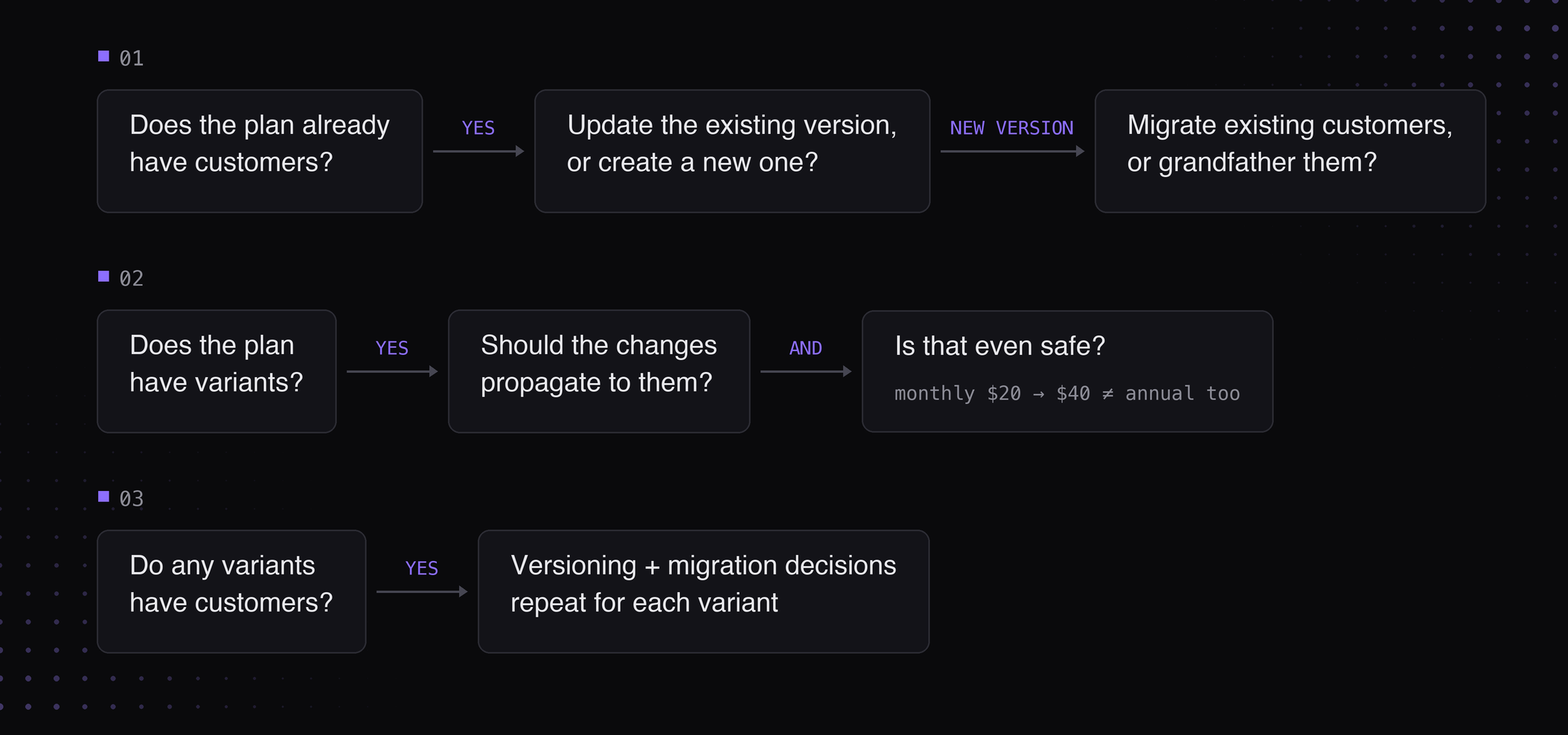
Traditionally, all of this logic has been encoded into a multi-step form in the UI that looks something like this:
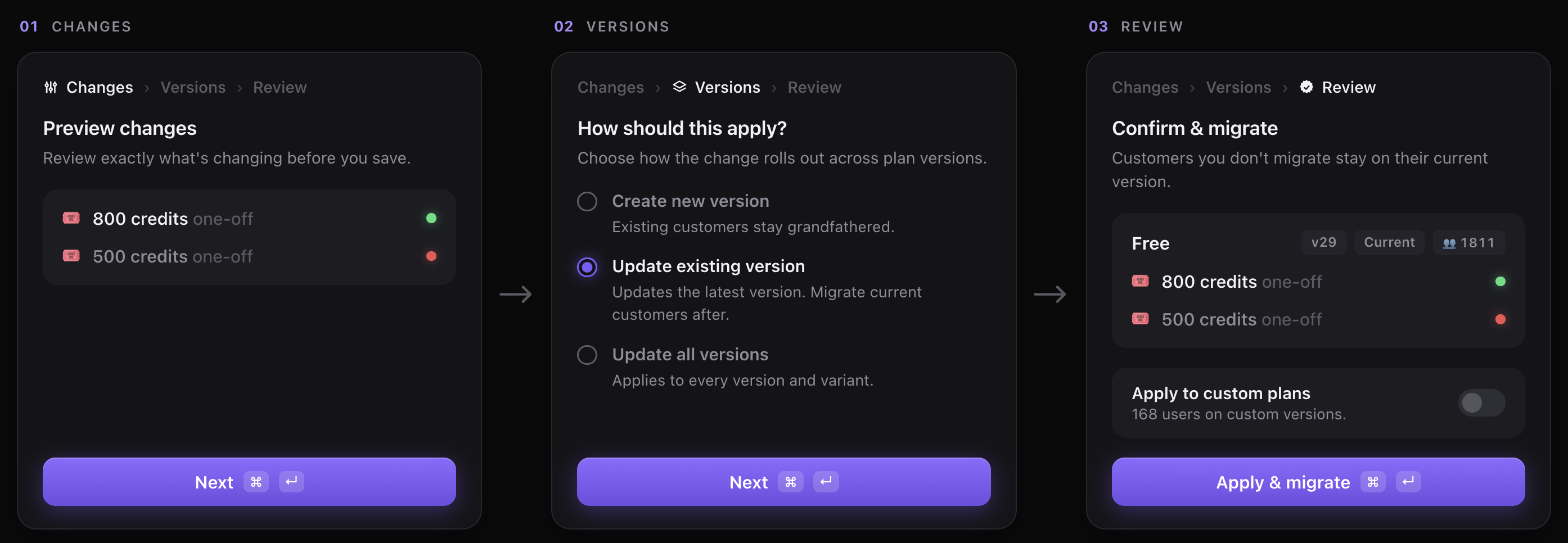
So now the question is: how do we design this for an agent? Or rather, what do these "flows" look like when encoding it into an API? For us, we did two things:
**1. Baking in "decisional" logic into our API endpoints**
Firstly, we moved all of the decision-making onto the backend. Instead of expecting the agent to infer what actions are valid, we expose them explicitly through `catalog.preview_update`.
For example, the endpoint returns fields like `has_customers`, `can_version`, and `variants`, allowing the agent to understand the current state of the pricing model and the decisions that need to be surfaced to the user.
Whether that's our own harness or Claude Code, the prompting becomes much simpler because the agent no longer has to reason about the workflow itself — it just follows the decision tree we've already computed.
**2. Unifying functionality into a single endpoint for the agent**
The second thing we changed was making these endpoints much broader than we usually would. Rather than separate endpoints like `/features.update` and `/plans.update`, we exposed a `catalog.update` endpoint that lets an agent update your entire pricing in one go.
Generally, good API design prefers smaller, resource-oriented APIs because it's intuitive for humans. Agents, however, work better when they have all the context up front, because they're able to reason over the pricing model in one pass, without having to "discover" it through a series of calls. We also get to save on latency :)
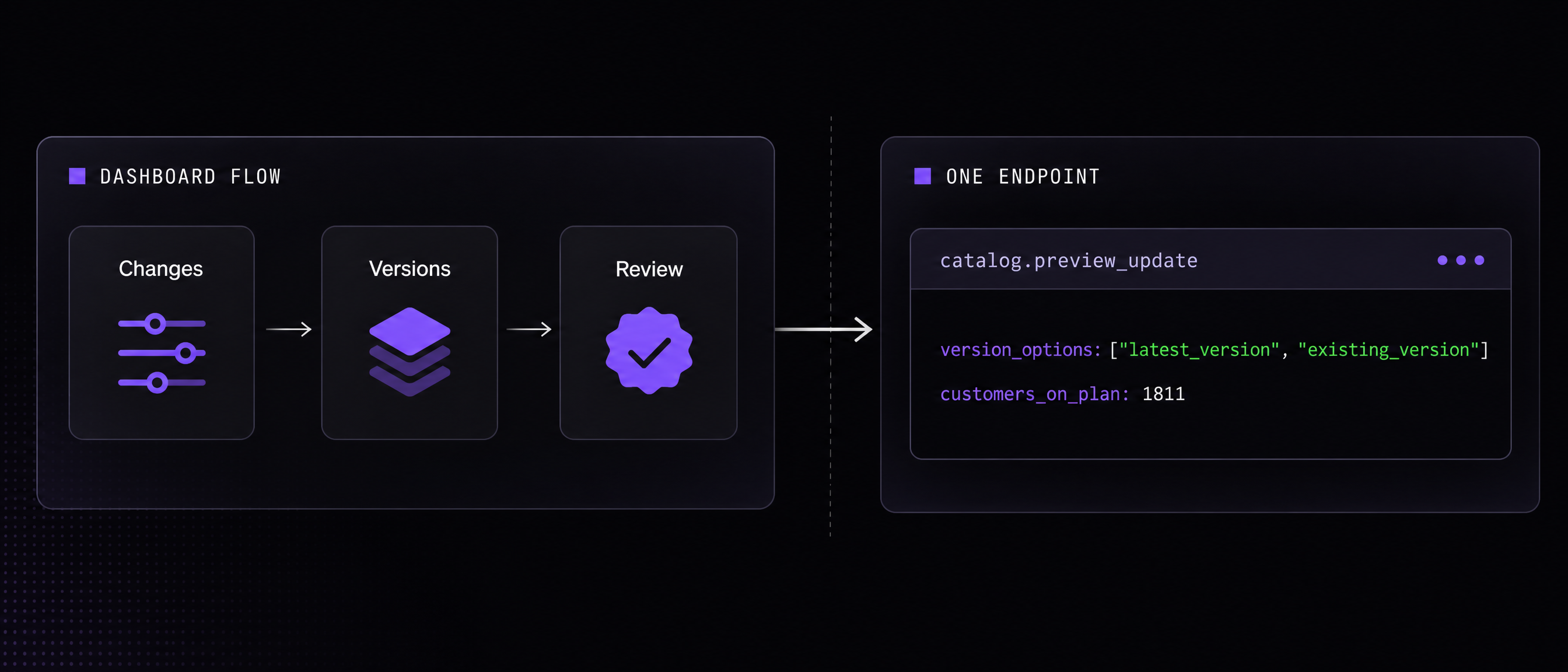
Basically, `catalog.preview_update` and `catalog.update` compress what used to be a complex, multi-step dashboard workflow into a form factor that's much more accessible for agents. We've been testing this across our internal harness, and it's worked surprisingly well.
### APIs as a source of truth (the modality sprawl)
Another problem we ran into was modality sprawl. For any workflow, we had to support it on several different interfaces:
- Dashboard
- Internal agent
- CLI
Take the previous "update plan" flow for instance. That complex multi-step workflow needed to be built for each of these modalities.
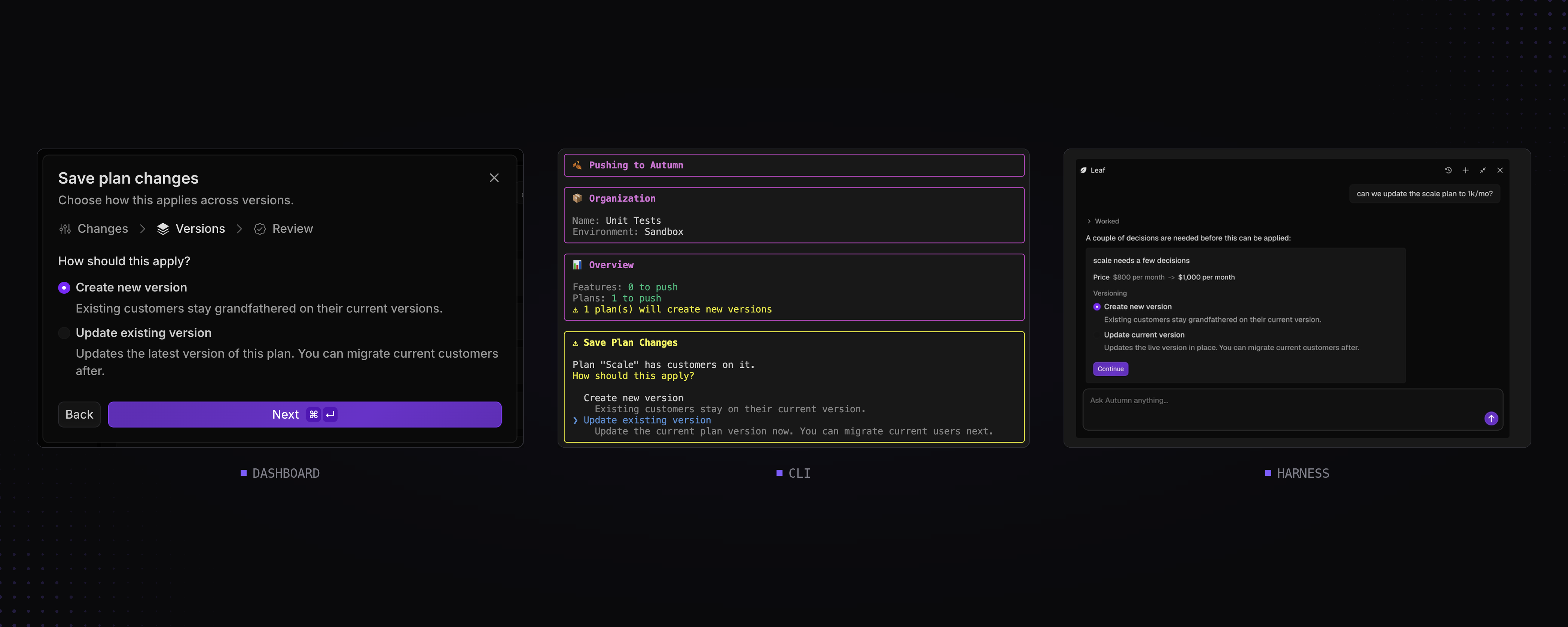
The issue with the way we originally built things was that each of these modalities owned parts of the logic for the workflow (like computing whether a plan can be versioned, and so on). And so whenever we added something new, such as variants, we found ourselves designing the same flow many times.
The fix was the same one we described earlier: move the workflow and all of its logic into the API. Instead of each interface implementing its own version of the flow, they all consume the same decision tree. The dashboard, CLI, and agents became thin wrappers over the same backend logic.
### Implementing preview endpoints
The last pattern we've found to be pretty helpful is pairing most write endpoints with a corresponding `preview` endpoint.
This originally had nothing to do with building for agents. In billing, users need to understand in full detail what the result of an action will be before committing to it: how much will be charged, which subscriptions will change, whether customers will be migrated, and so on. Since our users also needed to surface this information to their customers, these preview endpoints naturally became API-first. For example, here's the UI we show in our dashboard before you change a user's plan:
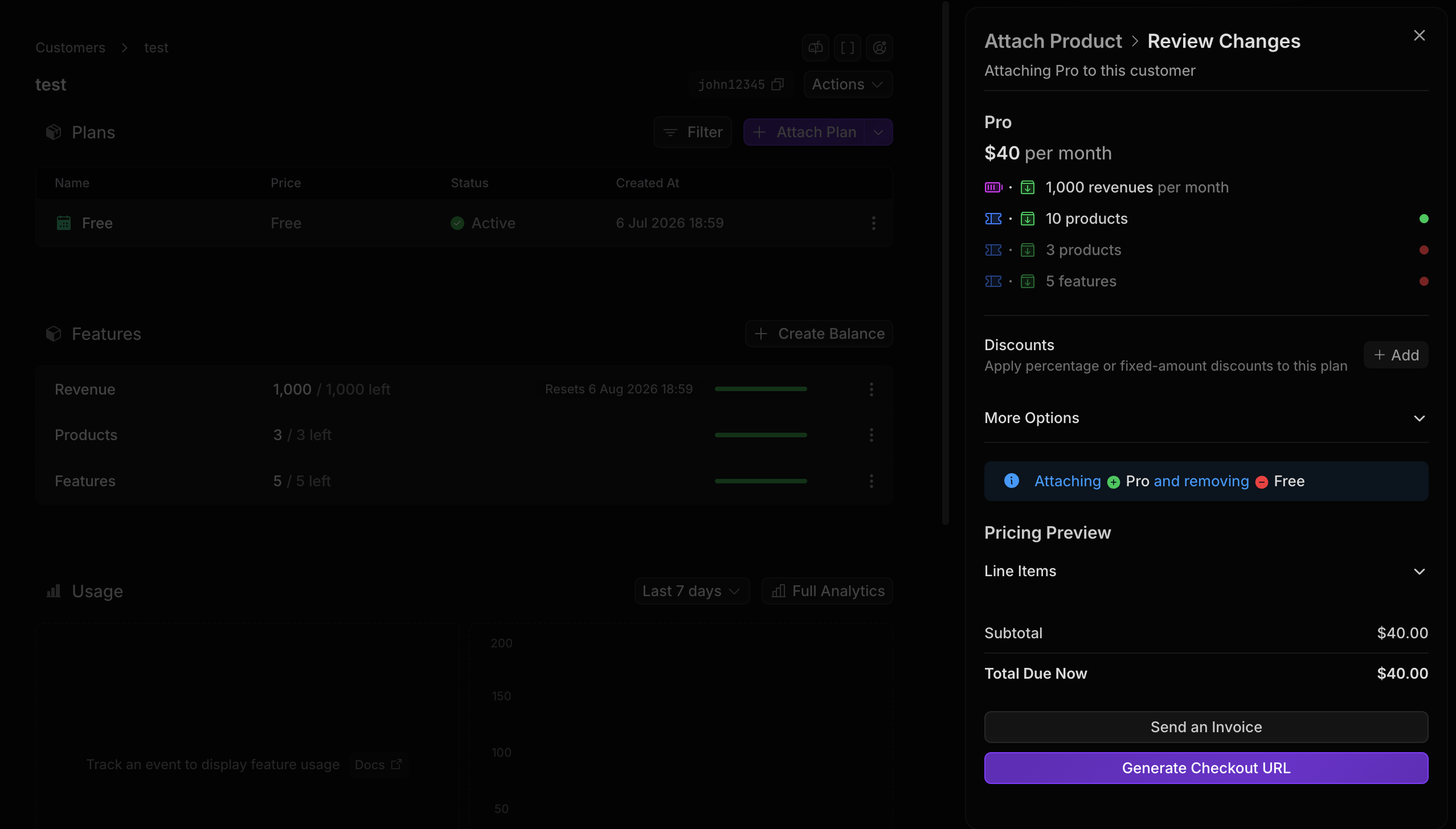
Incidentally, this ended up translating surprisingly well to agents. When we built our Slack agent for provisioning invoices and enterprise contracts, most of the work around guardrails was already done. The agent simply called the preview endpoint, surfaced the results to the user, and only executed the write once everything had been confirmed.
After seeing how well that worked, we started applying the same pattern elsewhere. `catalog.preview_update`, for example, gives an agent everything it needs to understand a catalog change (plans and features) before calling `catalog.update`.
I think treating preview functionality as a first-class citizen is extremely important when building for agents. These agents are ultimately a proxy for your dashboard, and they're only able to surface what they're able to retrieve.
### Final thoughts
It's been really interesting to see the patterns for good AX start to diverge from good DX as the way we interact with agents evolves.
Just last year, agents weren't very good at managing huge amounts of context, so they interacted with APIs much more like humans did: multi-step, coordinated, and fairly structured. Today though, they're much more autonomous, long-running, and free-form, which I think calls for a different way of thinking about how we build APIs.
I think we're going to start seeing some really interesting patterns emerge as people try to take advantage of this.
---
# How to build a flexible billing system
One of the hardest parts of software monetization is changing it.
Pricing is one of the highest leverage parts of a business to experiment with. Even more so today: AI and usage-based models are many times more dynamic than flat fees and seats.
But when you built your system, you hadn't planned for a pricing update each quarter. You just wanted to ship it quickly and get back to valuable features. That means every time your growth or sales team comes to you with an idea for pricing, you flinch because it's a month of rework.
We've been through this ourselves at Autumn — trying to build a system and data model to generalize pricing. We've made mistakes and seen scars from our customers, and so wanted to share our learnings on how to architect a billing system that requires as little maintenance and rebuild as possible.
### Billing is a relational system
Most people think that billing data is just their customer data and thus only track that in their database. Other things like plan configurations end up being stored in code. So for instance, you might have a config file like the one below for your plans, and then a column on your user table indicating which plan they're on.
This is definitely quick to ship, but let's now try to make a pricing change. Imagine we'd like to update the `pro` plan to cost $40 and grant 400 credits each month — Version Pro to update the config. On the customer side, we'd add another column for the version of the plan the customer is on.
Still relatively clean, but now you sign a custom deal with a user for them to pay $50/mo for 500 credits. To do this, we'd probably create another table called `custom_plans` and store the custom version of the user's plan in that table.
The problem with this is that our data is all over the place. Some plan data lives in code, while others live in the DB. There's no unified way to just fetch a customer and their plan info. The logic for this looks something like:
```tsx
import plans from "@plans"
const userPlanInfo = user.customPlan ?? plans[user.regularPlan]
```
Compare this to storing all of your plan info, custom or not, in a Postgres table. To add a new plan version, or customize a plan for a user, you simply add a row to your `plans` table.
Everything is centralized, you can fetch a user and their plan in a single query, and most importantly, it's extensible. For example, if you wanted to let customers choose different credit amounts on a plan, you could simply add a `plan_credit_amounts` table and relate it back to your existing plans and customers.
**Entitlements should be data too**
The same goes for entitlements. Hardcoding access like `const hasPremiumModels = () => user.plan === 'pro'` works until you need to grant one free user access, and you're back to conditional logic all over your codebase. Model entitlements as data instead: a plan grants them, customers inherit through their plan, with per-customer overrides when needed. An exception becomes a row change, not a code change.
The larger point here is that billing is really a set of relationships between your customers, plans, and entitlements, all of which evolve over time. If you treat it as such, you build a system that's much more robust and structured when it comes to pricing changes and save yourself the headache of re-building your system every time.
### Billing is hierarchical
The next important thing to understand about billing is that it's hierarchical. The same piece of configuration can often be specific to a customer, a plan, or even global. By designing your system so that configuration can be applied at any of these levels while sharing the same underlying logic, you make pricing changes much cheaper and easier to manage.

Let's look at an example. Imagine you have a `pro` plan that grants 100 credits per month. If you have a mix of sales-led and PLG customers, you probably end up creating custom contracts that grant arbitrary credit amounts. In that case, it might seem like a good idea to store the number of credits each customer receives directly on the customer row. However, let's say you now want to make a change to increase the number of credits this plan usually grants to 200/month. To do this you have to update every single one of your customers that's not on a custom plan. If you have a lot of these, that can get expensive — try raising it and watch the cost climb with your customer count:
Now let's consider a second way to model this system. We'll store the default number of credits the `pro` plan grants each month on the plan row, and then on top of that, we'll also have a column on the customer table that indicates whether they get a custom number of credits. Now, if we want to make the same change as above, all we need to update is one row! As you can see, this is much quicker and even safer since it's easily reversible:
This concept extends beyond entitlements. Take usage alerts as an example. You might define a global alert that applies to every customer by default, while still allowing individual customers to configure their own alerts. Ultimately, if you're aware of this concept and model things at the appropriate level, you're far more flexible and efficient when it comes to changes to the system.
### Don't design your billing around Stripe operations
This is something we've found tremendously helpful at Autumn. When it comes to Stripe, most people think in terms of transitions:
_"When we move a customer from Pro v1 to Pro v2, what Stripe update do we need to make?"_
In code, that usually turns into something like this:
```tsx
const subscription = await stripe.subscriptions.retrieve("sub_xxx");
const oldItem = subscription.items.data.find(
(item) => item.price.id == "price_pro_v1"
);
await stripe.subscriptions.update("sub_xxx", {
items: [
{ id: oldItem.id, deleted: true },
{ price: "price_pro_v2", quantity: 1 },
],
});
```
At first this feels reasonable, Stripe's API even encourages it, but over time these transitions start to pile up. Every new pricing model, migration, or edge case requires another piece of Stripe-specific logic — each one routing through its own conditional to a different Stripe call:
Before long, your billing system becomes a collection of upgrade paths and special cases. Eventually, your Stripe and application begin to drift apart and you start running into state mismatches where customers are on the wrong price in Stripe, have the wrong entitlements in your app, or fall out of sync altogether.
Alternatively, what we do is treat our application state as the source of truth and define a single translation layer between our application and Stripe. Rather than asking _"what Stripe operation should happen when this customer changes?"_, we ask a much simpler question: _"Given this customer's current state, what should their Stripe subscription look like?"_
Using the previous example, to move a customer from Pro v1 to Pro v2 all we need to do is update the customer's state in our DB, then sync that to Stripe. We no longer need to care about what plan they were originally on, or what their previous state looked like:
The important thing is that `syncToStripe` doesn't care how the customer got here. It doesn't matter whether they upgraded, downgraded, were migrated from a legacy plan, or manually edited by support. It only cares about the customer's current state and what Stripe should look like as a result.
(ps. this sync function isn't magic — it's just a mapping from your billing state to a set of Stripe subscription items. Using Stripe's inline prices helps too: you don't depend on pre-created Stripe price objects, so your billing stays decoupled from Stripe state.)
With this mapping layer, your billing system is now much more flexible, because you can make changes to a customer's state however you like, then simply re-run the mapping function to bring Stripe back in line. When you make a pricing change, you may need to edit the mapping function slightly, but it's going to be a lot cleaner than sprawling Stripe updates throughout your codebase. And perhaps the biggest benefit is that recovery is also now trivial. If a customer ever ends up out of sync, you don't need a bespoke repair script. You can simply run the same mapping function again and Stripe converges back to the correct state.
### Concluding thoughts
We've talked a lot about making billing systems flexible, and by now you might be thinking that it sounds like a lot of work. And honestly, it is.
Compared to the one-shot implementation you might get from Claude or Codex, many of these ideas require more thought upfront and will probably take longer to build. But a perspective I like to take (though I may be biased) is that billing is a lot like infrastructure: the decisions you make early on matter because they're incredibly painful to change once your business starts depending on them, and the shortcuts you take today can easily become bottlenecks that slow you down far more than they ever helped.
So I think it's important to find the right balance early on, and some of these trade-offs might be worth it! Or maybe you're already on your third billing rewrite and don't need convincing.
---
# Saying goodbye to multi-region (for now)
Last year we started to onboard companies with a global customer base. With our own users starting to appear in more regions, we decided to build a multi-region architecture to reduce latency times globally.
Initially, our services were isolated to one region, us-west.
Our aim was to reduce latency in two regions to start, us-west and us-east, and targeted a round trip latency of under 50ms. The main difficulty was that this applied to both reads and writes, so simply using DB read replicas weren’t an option. Ultimately, there were two major considerations:
- How to spin up our server in multiple regions
- More crucially though, how to make data reads and writes low latency across regions
## Spinning up our server in multiple regions
There were two options here. Either we went serverless with something like Cloudflare Workers, or we manually spun up stateful servers in different regions. We went with the latter for a couple reasons:
1. The whole point of this was to reduce latency. With serverless, we were afraid of inconsistent latencies due to cold startup times, which we benchmarked and proved to be true.
2. Our server was already stateful, and going serverless would’ve broken patterns we relied on. Event batching, for one, gets painful when every request runs in an isolated session.
This blog from [Unkey](https://www.unkey.com/blog/serverless-exit) was really helpful when we made our decision. Now our next challenge was deciding on a provider. Our requirements were simple:
- Latency should be as low as possible
- Spinning up multi-region servers should be as simple as possible
Surprisingly, we tried almost every provider we could find and none of them fit perfectly. We ultimately chose AWS ECS, managed through Flightcontrol, where we spun up an ECS service in us-west and us-east, then used Route53 to route requests based on region.
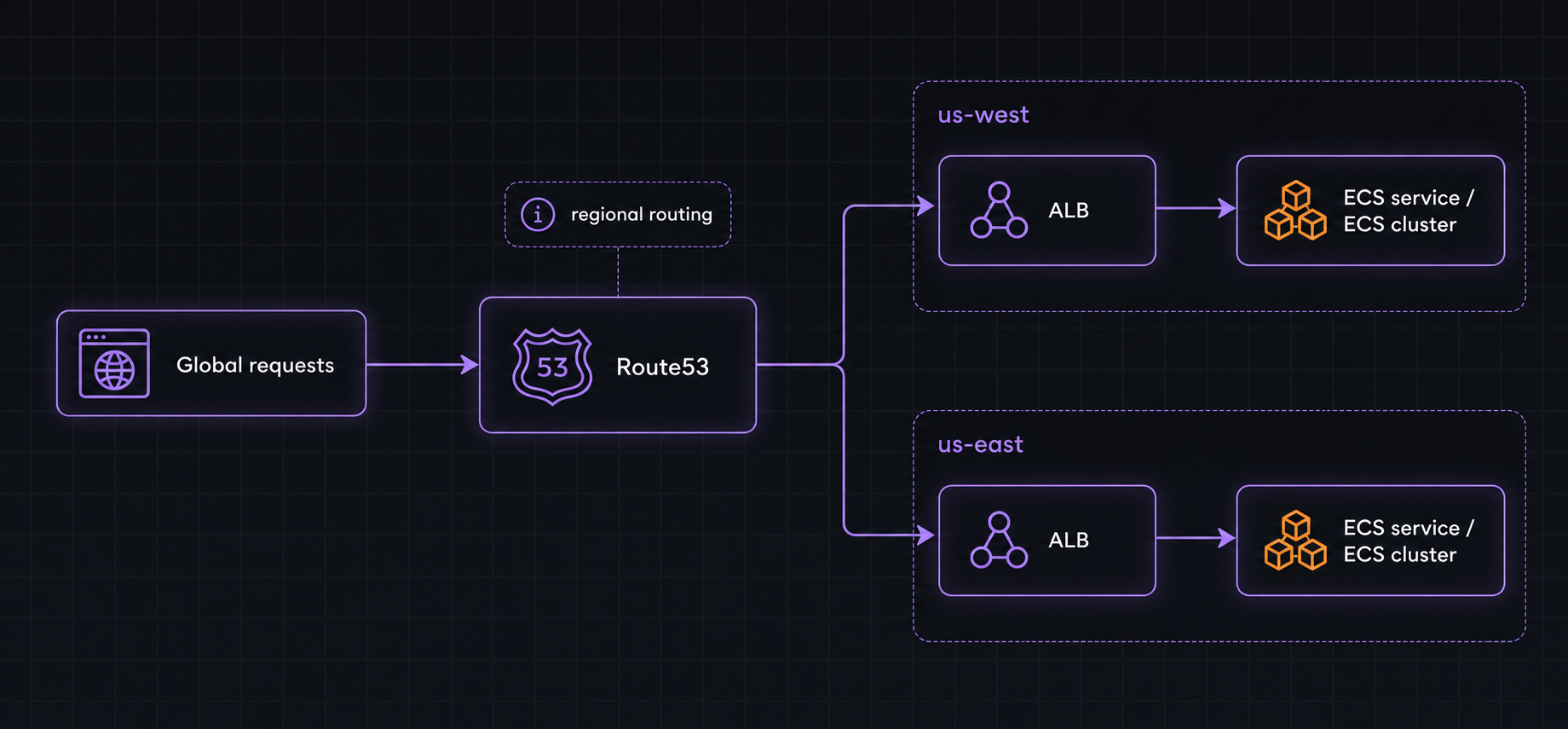
To explain why we came to this decision, it’s worth walking through the other top contenders.
**[Render](https://render.com/)**
We were originally on Render so this seemed like the obvious choice. However, Render doesn’t natively support multi-region, so to set this up we had to manually create instances in each region. More annoyingly though, the only way to have a single domain route to different instances was to use Cloudflare’s load balancer.
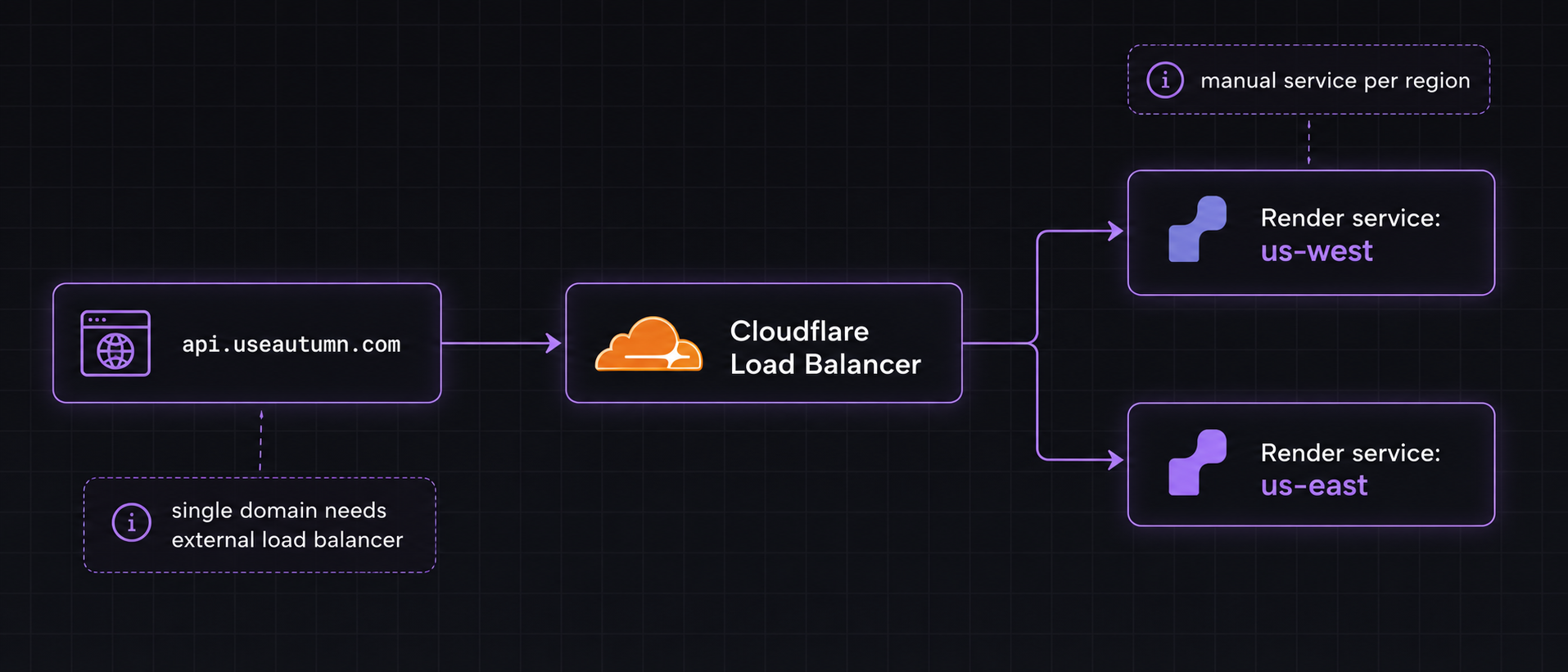
Ultimately, we chose AWS over Render because we found that Cloudflare's Load Balancer introduced additional latency compared to Route53, which resolved at the DNS layer. With Render, there were also multiple hops involved as Render itself uses Cloudflare in front of their services.
**[Railway](https://railway.com/)**
Railway was extremely compelling because they supported multi-region natively. That meant that you could spin up a single service, have it replicated across different regions, and they would handle load balancing, provisioning, and more for you. The DX was unmatched. Unfortunately though, Railway’s infra isn’t on AWS. They build their own machines. This means a couple things:
- Our database, cache, and other data stores wouldn’t be co-located with our server, unless we used Railway for those as well, which was too limiting for us
- Most of our users were also hosted on AWS so their servers wouldn’t be as close to ours
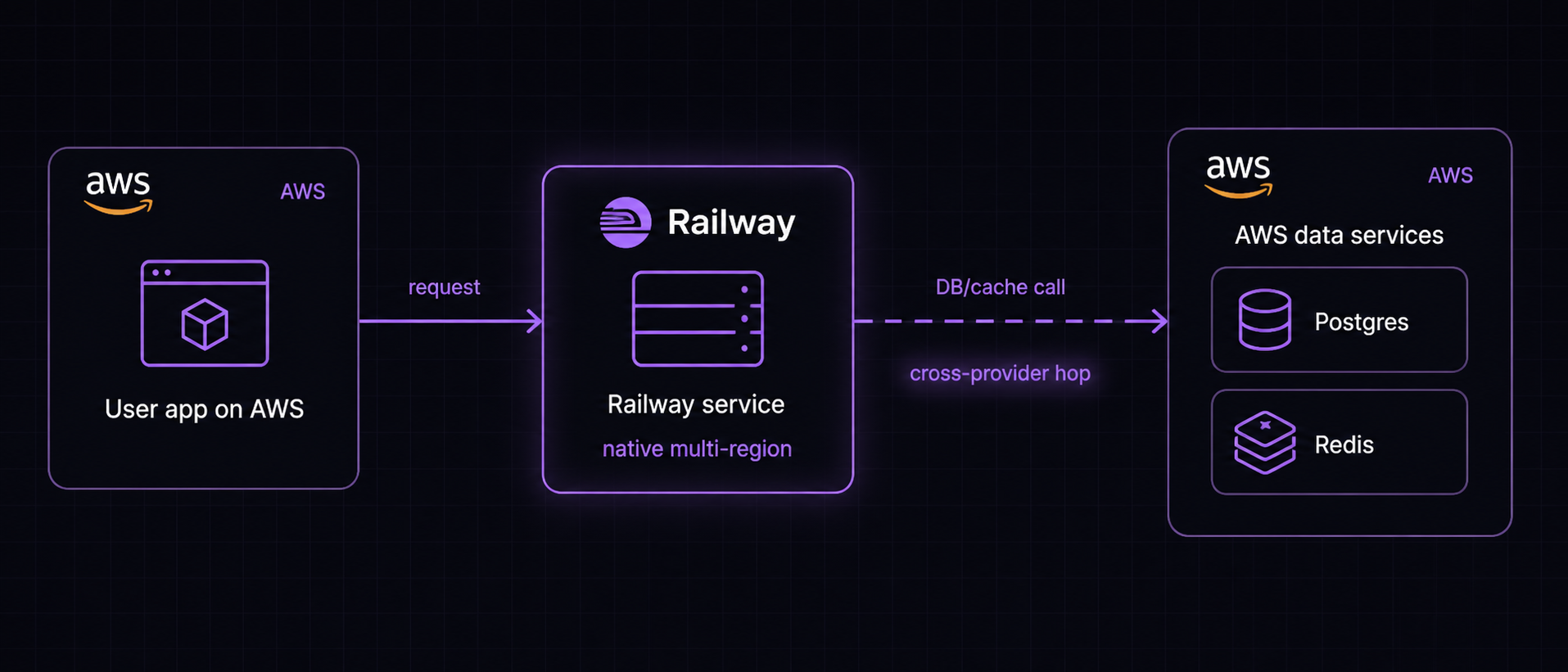
Ultimately, with both providers, the decision came down to latency. AWS consistently provided the lowest latencies in our benchmarks.
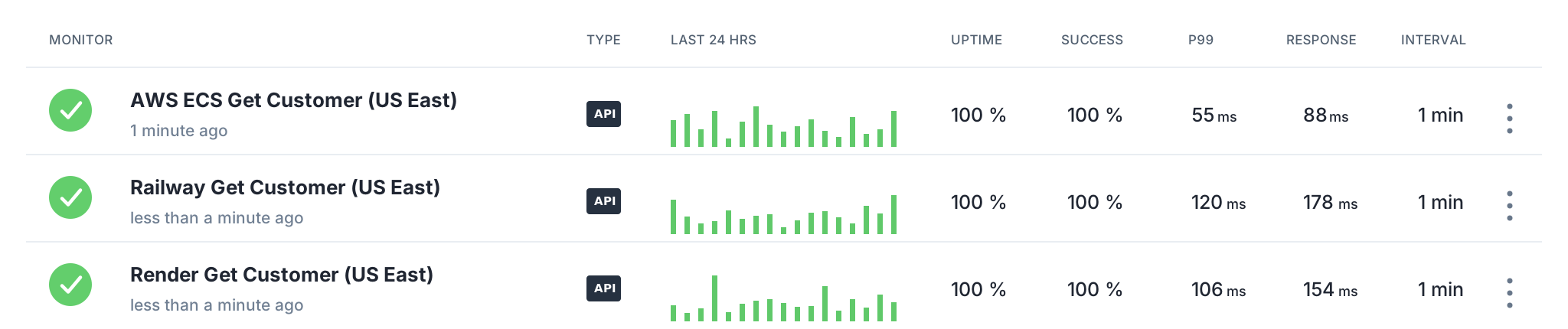
That said, ECS came with a bunch of maintenance overhead, especially coming from Render. Even with Flightcontrol, we had to build an internal dashboard to build and deploy across regions at once. Moreover, application and load balancer logs were an absolute pain to set up. But today I’m very glad we made the tradeoff. Having lower-level control over our infra has been useful, and AI has made things much easier too.
## Making data reads and writes multi-region
The bigger challenge we faced was with data access: making both reads and writes fast across regions. Think of us as a complex rate limiter. Before a request is allowed through, we often need to update usage counters atomically and decide whether the customer still has access.
For example, when you send a message to Cursor, they may deduct an estimated number of credits before accepting your message, then reconcile the actual usage afterwards. Since these writes sit on the hot path, they need to be real-time and fast. We considered several approaches to solving this.
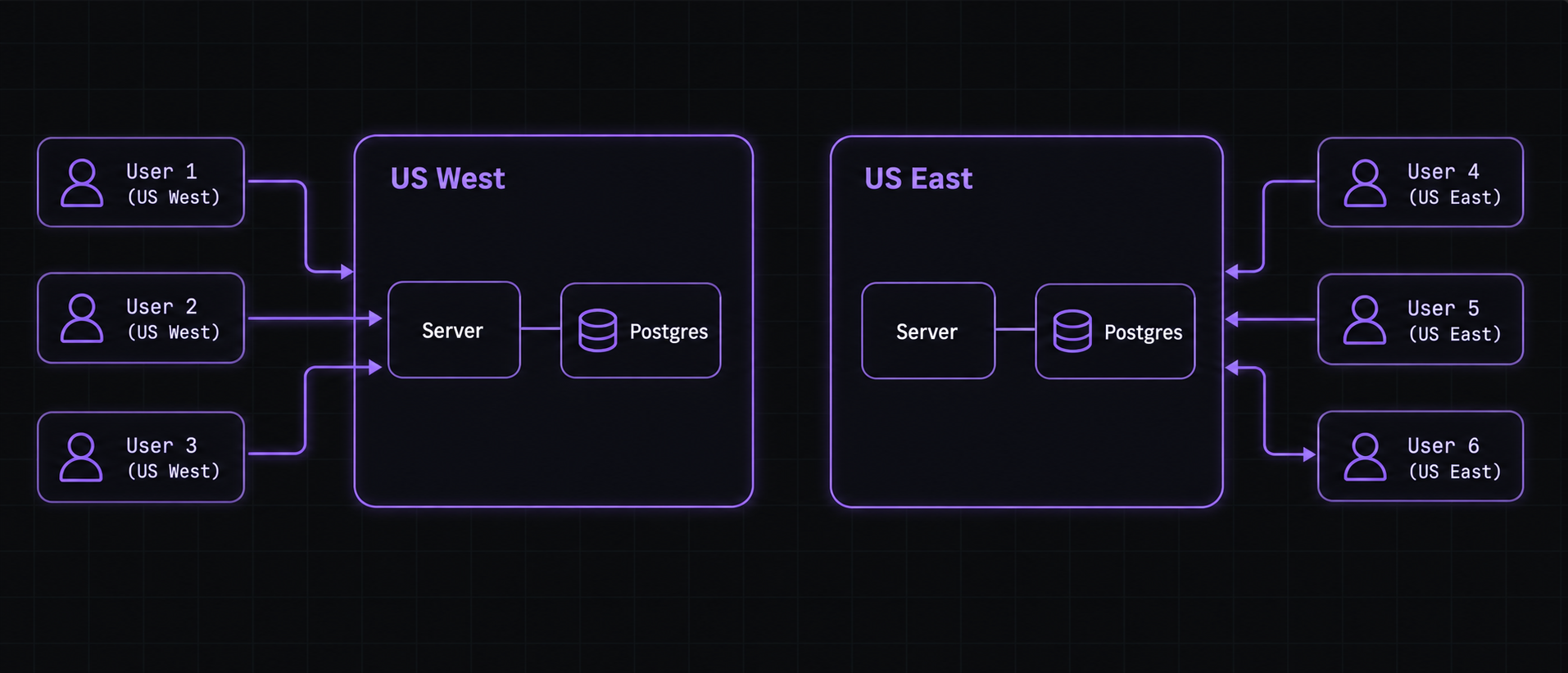
1. **A master database per region**
We’d spin up a Postgres database in each region, completely isolated from each other, and let our users pick which region their data lives in, so it sits closest to their server. The catch, beyond running multiple databases, is that our user’s own customers might be spread across regions. For example, if they’re running Cloudflare Workers, pinning a whole account to one region doesn’t hold up.
2. **A region per customer**
Instead of pinning our user, we could pin a customer: our user’s user. Each customer is tied to a region, and all their reads and writes happen there. We'd keep a record mapping customers to regions, and route each request accordingly.
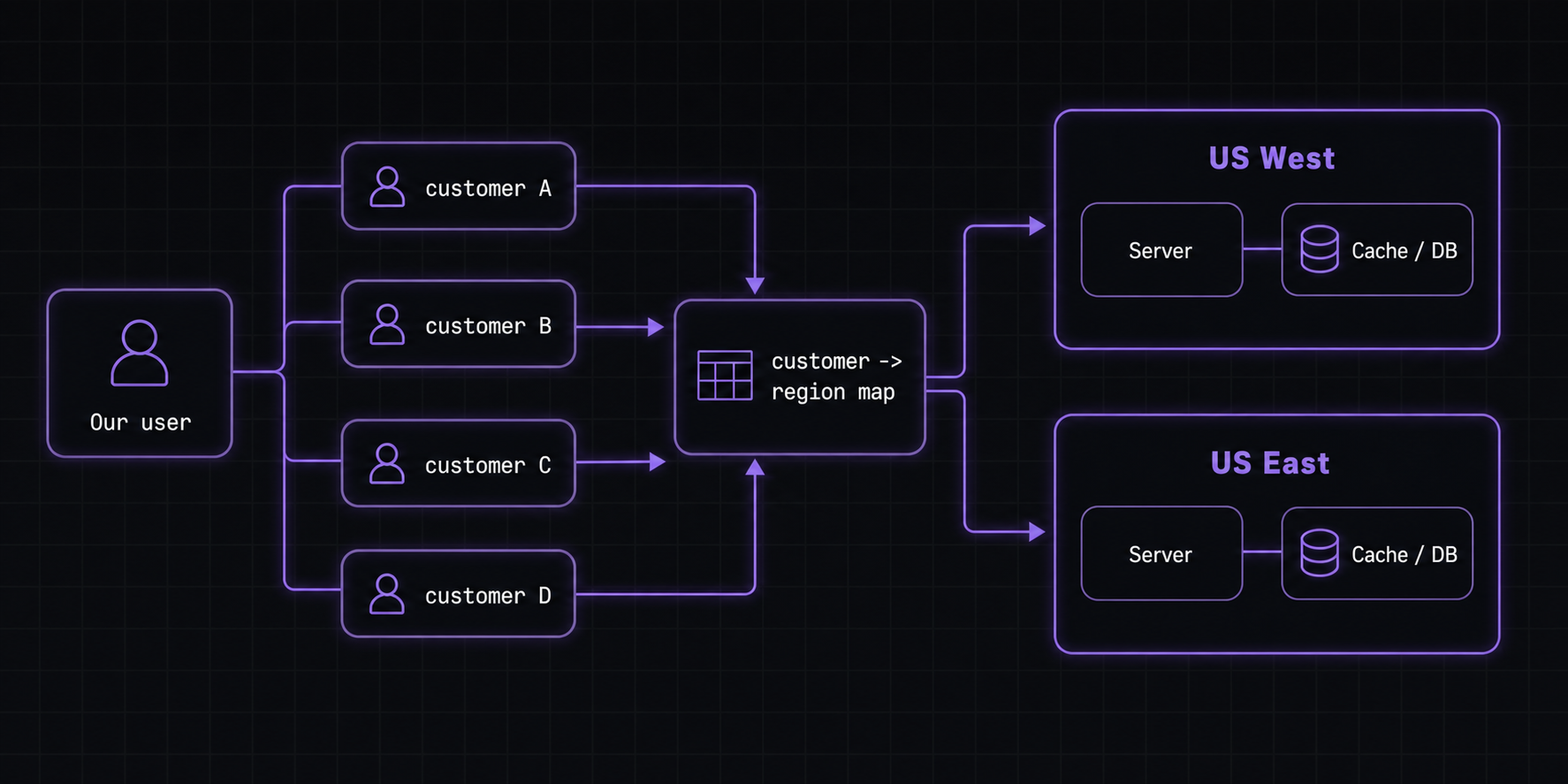
Now trying to do this with Postgres sounded like a headache. Imagine trying to JOIN data across different databases. We could simplify this with a read/write cache in each region instead of fully separate Postgres databases, but we still ruled it out because of the routing layer. We'd need yet another cache for the customer-to-region mapping, itself replicated across regions, and getting every request to the right region felt like way too much overhead.
3. **Active-active Redis database**
The final approach, which we ended up going with, was using an Active-Active database from Redis Cloud. You spin up Redis caches in multiple regions, all fully synced, and you can write to any of them. When concurrent writes hit the same key in different regions, Redis Cloud resolves the conflict using CRDTs: Conflict-free Replicated Data Types.
Using a counter as an example: two concurrent increment operations merge into their sum rather than overwriting each other. This fit our use case perfectly. Each server connects to its own Redis cache in the cluster, and since our writes are just increments, the conflicts get resolved for us.
## Why we went back
We chose the Active-Active Redis database for simplicity, and while it definitely created the least infra overhead, I think it wasn’t really the right solution for us, which led to more complexity than it was worth.
1. **Race conditions**
First of all, with the active-active database, even though it solved that counter case perfectly, we found ourselves running into a bunch of race conditions. Take the following example:
- We store each customer as a JSON blob with `customer_id` as the key
- Your customer performs an upgrade on us-east so we append to their `subscriptions` array
- At the same time, Stripe sends an `invoice.paid` webhook to our us-west server and we append to the customer’s `invoices` array
Now, both of these append operations happen on the same key and are done via a read-update-set operation. Since they happen in different regions, Redis resolves the conflict through a Last-Write-Win strategy. So either the invoices or subscriptions array will be missing an item.
To solve these types of issues, we’d often have to normalize the data. For instance, we might store the subscriptions and invoices array as separate keys, `customer_id:subscriptions` and `customer_id:invoices`. Ultimately though, we ran into these issues more often than we’d hoped, especially since it was hard to replicate a multi-region setup locally.
2. **Infra overhead**
The second issue we kept running into was infra overhead. It wasn’t just slowing us down; it was starting to affect reliability too.
A couple of months ago, we had a user run a cron job every hour that spiked our Redis CPU and degraded the server. The quick fix would’ve been to spin up a separate Redis database for that user, so their load wouldn’t impact everyone else. But because of our multi-region architecture, what should have been a simple isolation fix became much more complex and delayed.
Reliability matters more to us than latency. So when our architecture made it harder to ship reliability fixes quickly, that was a strong signal that the tradeoff no longer made sense.
Ultimately, the thing that pushed us to move back to a single-region architecture was noticing that traffic was split roughly 95:5 between us-east and us-west. Taking on all of that complexity and giving up speed and reliability for this small slice of traffic didn’t feel worth it.
## Conclusion
Ever since we’ve moved back to a single-region architecture, we’ve been way more confident in our infra and reliability, and have been able to make changes, introduce new services, and ship features way faster too. Focusing on optimizing a smaller scope has felt like a huge difference. So generally, we’re very happy about our decision. Now, two concluding thoughts:
**Don’t “move fast and break things” with infra**
I think the mistake we made with our multi-region setup was optimizing for simplicity and speed rather than choosing the architecture that would hold up best long term. Infra is a little counterintuitive to the usual “ship fast” startup advice. These decisions affect reliability directly, and they’re often some of the hardest decisions to reverse later. So while speed still matters, infra choices deserve more upfront thought than your average product decision.
**The “smart” choice isn’t always the best one**
With our original approach, I think we convinced ourselves that an Active-Active Redis database would be a silver bullet, and that choosing it was the “smart” move. But infra is all about tradeoffs. There’s a reason writable database replicas aren’t common: they add a lot of complexity, and that complexity has to show up somewhere.
We’ll definitely go back to multi-region at some point. But when we do, I think we’ll take a “less hacky” approach: route each customer to a single home region, and keep their data and traffic there. It’s much easier to reason about, and probably a lot more reliable.
---
# We built a billing company but didn't replace Stripe Billing
Autumn isn't a replacement for [Stripe Billing](https://stripe.com/gb/newsroom/news/stripe-launches-billing). Your subscriptions and invoices stay exactly as they are. People often get confused when we tell them this, perhaps it's because most of the other players in the space have built their own billing engines and invoicing systems from the ground up. So when people learn that we haven't done the same, it naturally leads to the question: **what benefit do you offer over Stripe?**
I figured I'd write an article answering this. The short answer is pretty simple - we're solving a different problem, or rather, a different layer.
### Subscriptions and invoices
Stripe Billing launched when the recurring payment model (aka subscriptions) started to take off. About a decade ago, people used to build this in house. Companies would run cron jobs which queried over their customers table daily, identified who was due for a payment, generated an invoice for each one, and charged their card.
As with any in-house solution, there's always more than meets the eye. Things like managing different payment methods, plan switches, retrying failed payments, etc. That's just on the subscription management side, invoicing was a whole different beast with things like taxes, schedules and more coming into play. These were the primitives that Stripe Billing was built around.
### Credit based pricing
Subscriptions and invoices haven't gone anywhere. They still sit at the center of every company's billing, and Stripe's core abstractions around them have stood the test of time. What's grown complex, however, is everything companies now build on top - especially as AI brings new ways to price and package.
This is the layer that we're solving, and it's particularly relevant for companies with credit-based pricing. To understand why, let's walk through an example by thinking about how one might build this in-house. Imagine your pro plan grants users some number of credits every month.
You might begin by building a simple credit ledger in Postgres. Here's how it works:
- You run a cron job every month to top users up with a number of credits
- Every time a user performs an action in your app, you insert an event into this table
- To get the number of credits used per user, you run an aggregation over this table
This works when credit usage is infrequent, maybe a couple of times per day. But if you have to run these aggregations a couple of times per second, it gets expensive. Take Cursor for example, every time you send a message, they check whether you have enough credits and block you if you don't. So how do you solve this? You add a caching layer in front of this events table and store users' credit balances in real time. Every time a credit is used, you update this cache and add an event to the initial table.
Next, you decide you want to start giving out credit coupons, but these are slightly different to the ones users get each month: they don't reset. So now you need to figure out a way to distinguish between these balances in your events table and cache. The list of features that you can build around this goes on and on - rollovers, usage analytics, alerts, auto top ups. Before you know it, you're maintaining an entire system alongside your core product!
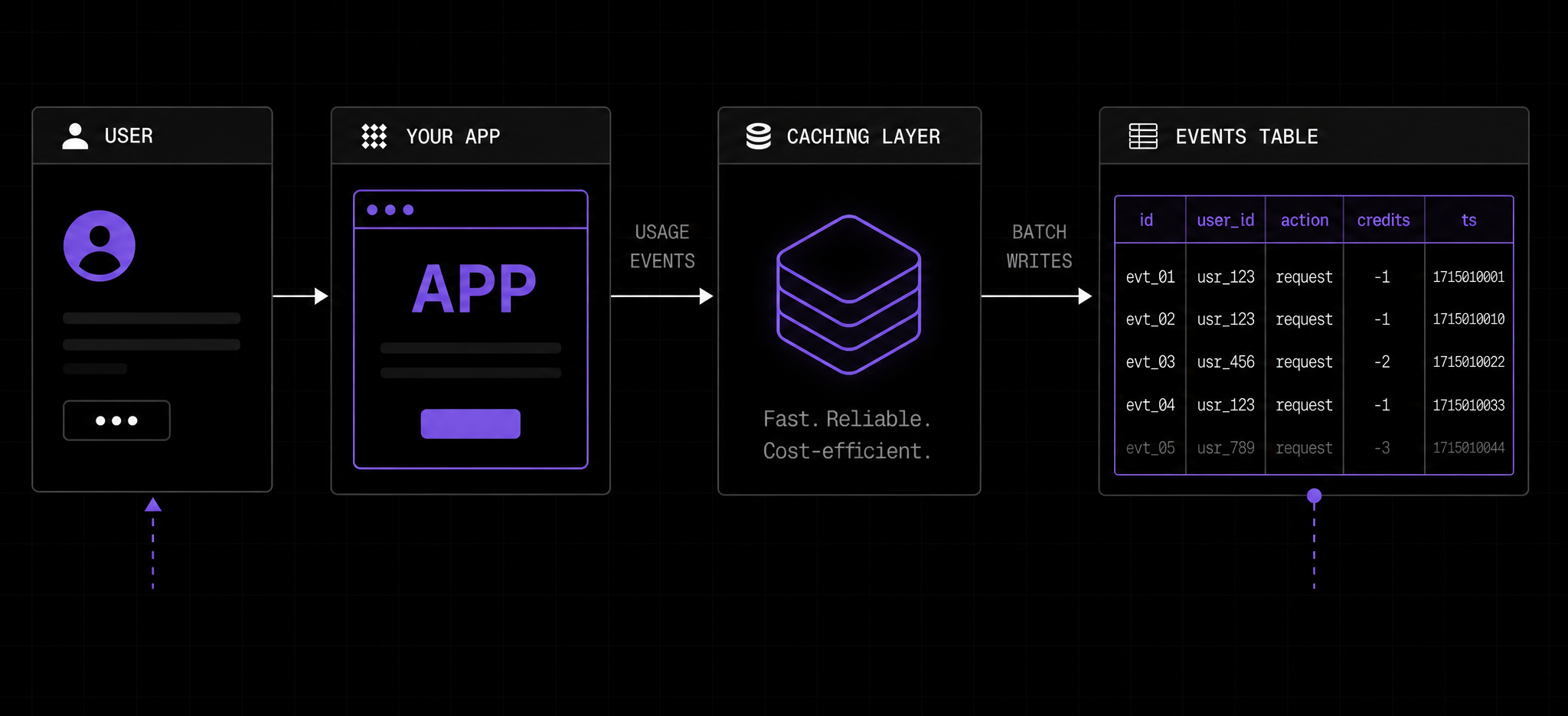
*OpenAI published a good blog [here](https://openai.com/index/beyond-rate-limits/) on building a similar system in house.*
Just as Stripe Billing abstracted away the complexity of subscription management and invoicing, this is the layer we're focused on simplifying - the application state that companies manage around billing! And hopefully we've demonstrated by now how they're two fairly different problems.
### Where we overlap
All that being said, Stripe Billing has expanded since its inception and solves way more than just subscription management. So we're really more of an overlap - sometimes we don't fully agree with the primitives it has built, and choose to build our own version in house. Usage-based billing is a good example.
Usage-based billing has evolved quite a bit since 2020. Early on, it was very "write-heavy." Infrastructure providers like Supabase charged per compute hour: they'd record how many you accrued over the billing period, then charge you at the end. There was no checking whether you'd hit a limit. You might occasionally visit your billing page to view how much usage you've accumulated, but for the most part, reads weren't critical - writes were.
Compare that to today where pricing models look more like "X credits per month". Some people might call this as "consumption-based" billing. This type of model warrants a different architecture because you would perform a read to check that the user has enough credits before each action, and a write afterwards to record it.
While there's a ton to say about this, the point here is that Stripe's usage-based billing was largely built for the first model, whereas these days we're seeing a lot more of the second, and therefore it's not entirely feasible to use Stripe's primitives here.
### Conclusion
Hopefully this gives you a better idea of how Autumn compares to Stripe - putting it into words has definitely given me a bit of clarity! If you're wondering whether we'd be a fit for your company, you can always email me [here](mailto:john@useautumn.com) - happy to advise either way :)
---
# Building an AI agent to automatically investigate support tickets
Billing is inherently stateful. The outcome of an API call depends on a customer's billing state and history. For instance, if a customer schedules a cancellation, then later upgrades their plan, the cancellation may need to be automatically undone. This means that simple operations sometimes have confusing results, leading to more support tickets and bug reports.
Investigating these issues usually means digging through logs to reconstruct a customer's billing timeline: what actions they took leading up to the request, what state the customer was in at the time, and what happened after the request. So for a single ticket, we'd have to write a bunch of queries on Axiom (where we store all of our logs), sift through hundreds of logs and analyse the request / response payloads to piece together what happened.
You can imagine how tedious this would be if done manually. We'd sometimes spend entire days on investigations.
### Structuring our logs
To understand how we automate investigations, it's worth first understanding how we structure our logs. We spent a lot of time making them structured, queryable, and easy to reason about for ourselves, and incidentally, this also made them extremely effective for AI agents.
Firstly, logs are request centric — every log in our codebase adds context to the originating request by enriching a JSON payload which is outputted once at the end of the request. It adopts the principles of wide logging explained in this [article](https://loggingsucks.com/). At the minimum, each request will have the following properties:
- Tenant context (which org and customer made the request)
- Request / response body
- Miscellaneous info like timestamp, API version, etc.
This is implemented via middlewares, and an example of the one which adds tenant context is shown below:
```tsx
export const analyticsMiddleware = async (c: Context, next: Next) => {
const ctx = c.get("ctx");
const skipUrls = ["/v1/customers/all/search"];
ctx.logger = addAppContextToLogs({
logger: ctx.logger,
appContext: {
org_id: ctx.org?.id,
org_slug: ctx.org?.slug,
env: ctx.env,
auth_type: ctx.authType,
customer_id: ctx.customerId,
api_version: ctx.apiVersion?.semver,
scopes: ctx.scopes
},
});
await next();
const finalCtx = c.get("ctx");
logRequestResult({ ctx: finalCtx, skipUrls });
};
```
(ps. perhaps obvious, but if there's one thing to add to logs, it's tenant context. It's by far the most effective filter and often the starting point of most investigations)
Secondly, we treat logs as a first class citizen when shipping features. The way we do this is that we have a field in our request context object `extras` which is append only and a flexible schema.
For each endpoint, as we walk through the request, we intentionally write functions to add to this `extras` object — capturing the information necessary to understand the customer state at that point. For instance, during upgrades we log which plan is outgoing, which plan is incoming, if there was a previous cancelation and so on. Here's an example of the information we log for an upgrade request:
```tsx
{
"checkoutMode": "stripe_checkout",
"invoiceMode": "default",
"planTiming": "immediate",
"product": "premium (v1) standard",
"currentProduct": "free",
"scheduledCustomerProduct": "none",
"stripe": "no sub | no schedule",
"timestamps": "Current: 25 May 2026 09:33:34 | Billing Anchor: now | Reset: now",
"transition": "free -> premium (immediate)",
"trialContext": "none"
}
```
### Teaching our AI agent how to investigate
With our logs structure in place, investigations became much more definable. It's simply a process of iterating over queries until you have the right set of logs to make an accurate assumption on what happened.
To pass this information to an agent, all we did was:
- Hook Claude Code up to Axiom's MCP and skills
- Write a couple of custom skills detailing how we structure our logs, the different "domains" of investigations (billing, stripe webhooks, entitlements, etc.)
- For each domain, add core pieces of information on how it roughly works under the hood (for instance, with entitlements, how our caching structure works)
Here's an example of the top level skill and one of the domain specific reference files:
````mdx
---
name: axiom-investigate
description: "Investigate support tickets and debug customer issues using Axiom logs via the user-axiom MCP. Use when asked to investigate, debug, check logs, diagnose billing (attach, upgrade, cancel), entitlements (check, track, balance, rollover), or any customer issue."
---
# Axiom Investigation
## MCP tools
Use the `user-axiom` MCP server:
- `queryDataset` -- run APL queries. Accepts `apl`, `startTime` (default "now-30m"), `endTime` (default "now").
- `getDatasetFields` -- list all fields in a dataset. Use to discover schema before querying.
Always restrict `startTime`/`endTime` to the smallest range that covers the incident.
When confirmation requires live DB state, use the `planetscale` MCP to query directly — but ALWAYS ask the user for permission first.
## Query precision rule
Never use `search` unless absolutely necessary. Broad search scans every field across many rows, which is slow, expensive, and usually less precise.
Prefer structured filters on fields like `context.customer_id`, `context.org_slug`, `req.url`, `stripe_event.*`, and `workflow.*`. When listing requests, add `isnotnull(statusCode)` so you fetch the one result log per request instead of every internal log line for that request.
## Dataset
All server logs go to the **`express`** dataset via `@axiomhq/pino`.
## Field reference
Every log line has standard Pino fields plus structured bindings:
| Path | Fields | Description |
|------|--------|-------------|
| `context.*` | `org_id`, `org_slug`, `env`, `customer_id`, `auth_type`, `user_id`, `user_email`, `api_version` | App context -- org, customer, auth |
| `req.*` | `id`, `name`, `url`, `method`, `body`, `query`, `user_agent`, `ip_address`, `timestamp` | Request metadata. `req.id` is the trace ID for correlating logs within one request. |
| `stripe_event.*` | `id`, `type`, `object_id` | Stripe webhook event context |
| `workflow.*` | `id`, `name`, `payload` | Background worker/job context |
| (top-level) | `msg`, `level`, `statusCode`, `durationMs`, `res`, `extras`, `error`, `done` | Per-log-line fields |
**`level`** values are uppercase strings: `DEBUG`, `INFO`, `WARN`, `ERROR`.
**`extras`** is a JSON object with domain-specific data (billing plans, webhook changes, etc.). Parse with `parse_json(tostring(extras))`.
**`auth_type`** values: `PublicKey`, `SecretKey`, `Stripe`, `Worker`, `Vercel`, `Revenuecat`.
## Investigation workflow
### 1. Scope
Filter by `context.customer_id` or `context.org_slug` plus a time range. Always start narrow.
### 2. Find the incident window FIRST
Heavy queries over wide ranges time out. Run a cheap aggregate first to locate WHEN, then a focused query in a tight window.
**Pass A — cheap, wide.** `summarize` over `bin(_time, ...)`, ≤3 columns:
```
['express']
| where ['context.customer_id'] == 'CUSTOMER_ID'
| summarize errors = countif(level == 'ERROR'), total = count() by bin(_time, 5m)
| sort by _time desc
```
**Pass B — heavy, narrow.** Use MCP `startTime`/`endTime` to bound to ≤1h around the bucket Pass A surfaced. Use `parse_json`, joins on `req.id`, etc. Skip `project` — pulling the full row keeps debugging interactive (you don't have to re-run when you realize you need another field). Skip `sort by _time asc` too — Axiom's natural order suffices. Only add an explicit `sort by` when you genuinely want the OPPOSITE direction (`desc` for newest-first browsing).
If Pass A is empty, widen Pass A or change the predicate — don't run Pass B. If Pass A finds multiple buckets, run Pass B once per bucket.
### 3. Triage
Inside the narrowed window, look at errors and warnings first (`level == "ERROR" or level == "WARN"`), then broaden to INFO if needed.
### 4. Trace
Use `req.id` to follow a single request across all its log lines. Use `stripe_event.id` to trace a webhook through its handlers.
## Query templates
**All logs for a customer in a time window:**
```
['express']
| where ['context.customer_id'] == 'CUSTOMER_ID'
| where ['context.org_slug'] == 'ORG_SLUG'
```
**Errors/warnings for a customer:**
```
['express']
| where ['context.customer_id'] == 'CUSTOMER_ID'
| where level in ('ERROR', 'WARN')
| sort by _time desc
```
**Stripe webhook events for a customer/org:**
```
['express']
| where ['context.org_slug'] == 'ORG_SLUG'
| where isnotempty(['stripe_event.type'])
| sort by _time desc
```
**Worker job failures:**
```
['express']
| where isnotempty(['workflow.name'])
| where level in ('ERROR', 'WARN')
| sort by _time desc
```
The omitted `project` is intentional — pull the whole row so you can pivot mid-investigation without re-running. The omitted `sort by _time asc` is intentional — Axiom's natural order is fine; only add `sort by _time desc` when you specifically want newest-first.
## Never use `search` unless absolutely necessary
Only fall back to `search` if (1) the identifier has no obvious structured field, AND (2) the time window is ≤1h. Otherwise: query a structured field, or use Pass A to find the time bucket first, then narrow.
## Domain-specific guides
Read these when the investigation falls into a specific domain:
- **Billing** (attach, upgrade, downgrade, cancel, payment, checkout, auto top-up): read [billing-investigation.md](billing-investigation.md)
- **Entitlements** (check, track, balances, rollovers, `allowed`): read [entitlement-investigation.md](entitlement-investigation.md)
- **Stripe Webhooks** (subscription lifecycle, invoice payment/failure, checkout, schedule changes, customer timeline): read [stripe-webhook-investigation.md](stripe-webhook-investigation.md)
- **Redis slow commands** (latency, cache perf, SLO breaches, V2 FullSubject cache): read [redis-slow-command-investigation.md](redis-slow-command-investigation.md)
- **Infrastructure** (worker queues, rate limiting): _coming soon_
````
````mdx
# Entitlement Investigation
Read this when investigating: wrong `allowed` on check, balance or rollover discrepancies, usage over time, track deductions, auto top-up, balance resets, or rate limits on check/track.
**Prerequisite:** Read [SKILL.md](SKILL.md) first for dataset, field paths, and general Axiom workflow.
## Confirm routes (do not rely only on the list below)
Routes change. Confirm current paths in:
| Router | Path |
|--------|------|
| Check, track, balance CRUD | `autumn/server/src/internal/balances/balancesRouter.ts` |
| Customer get/create/update | `autumn/server/src/internal/customers/cusRouter.ts` |
| Entity get/create/delete | `autumn/server/src/internal/entities/entityRouter.ts` |
**Preliminary paths** (all under `/v1` when mounted from `apiRouter`): check `/entitled`, `/check`, `/track`, `/events`, `/balances/*`, `GET /customers/:id`, `POST /customers.get_or_create`, entity GET/RPC equivalents.
## Investigation approach: parse `req.body` and `res`
Unlike billing (heavy `extras`), entitlement work is usually **timeline analysis** from request/response bodies:
```
| extend bodyJson = parse_json(tostring(['req.body']))
| extend resJson = parse_json(tostring(res))
```
Use `coalesce(tostring(bodyJson.customer_id), tostring(['context.customer_id']))` when customer id is only in context.
## Check / entitled response (`res`)
Typical feature-check shape (newer API versions; older clients get transformed shapes -- see `autumn/shared/api/balances/check/changes/`):
| Field | Notes |
|-------|--------|
| `allowed` | Main signal |
| `customer_id`, `entity_id` | |
| `balance.granted`, `balance.remaining`, `balance.usage` | Metered / credits |
| `balance.unlimited`, `balance.overage_allowed`, `balance.next_reset_at` | |
| `balance.breakdown[]` | Per slice: `included_grant`, `prepaid_grant`, `remaining`, `usage`, `reset`, `expires_at` |
| `balance.rollovers[]` | Rollover lines -- good for "where did rollovers drop off?" |
| `flag` | Boolean-feature path when not using balance object |
**Response filter:** public API responses may strip some internal fields (e.g. certain `object` keys, `overage` on breakdown). Dashboard / internal paths may show more. See `autumn/server/src/honoMiddlewares/responseFilter/responseFilterMiddleware.ts`.
## Track response (`res`)
| Field | Notes |
|-------|--------|
| `customer_id`, `entity_id`, `event_name`, `value` | Deduction amount |
| `balance` | Updated `ApiBalanceV1` after track |
| `balances` | Map of feature_id -> balance when multiple features |
## Get customer / get entity (`res`)
Both expose **`balances`** (record keyed by feature id) and **`flags`**. Best snapshot of "all balances at a point in time" for correlating with check/track.
## Other signals in logs
| Source | What to use |
|--------|-------------|
| `statusCode` | `402` insufficient balance; `429` rate limited |
| `msg` + object | `[QUEUE SYNC]`, `[SYNC V3]`, Postgres track fallback, `Deduction updates` with `data2` (cusEntId, featureId, balance, adjustment) |
| `extras.setCache` | Full-customer cache write (large; includes `fullCustomer`) |
| `extras.autoTopupContext` | On `auto-top-up` worker: threshold, quantity, feature, cusEnt balance |
## Background `workflow.name` values
| Name | Role |
|------|------|
| `sync-balance-batch-v3` | Redis -> Postgres after track |
| `insert-event-batch` | Batched event inserts |
| `auto-top-up` | Low balance top-up |
| `expire-lock-receipt` | Lock expiry |
| `batch-reset-cus-ents` | Interval resets |
## APL patterns
**Balance timeline (check, track, customer GET):**
```
['express']
| where ['context.customer_id'] == 'CUSTOMER_ID'
| where (
['req.url'] contains 'check' or ['req.url'] contains 'entitled'
or ['req.url'] contains 'track' or ['req.url'] contains 'events'
or ['req.url'] contains 'customers'
)
| where isnotnull(statusCode)
| extend resJson = parse_json(tostring(res))
| extend bodyJson = parse_json(tostring(['req.body']))
| extend featureId = coalesce(tostring(bodyJson.feature_id), tostring(bodyJson.event_name))
| extend allowed = tostring(resJson.allowed)
| extend remaining = toint(resJson.balance.remaining)
| extend usage = toint(resJson.balance.usage)
| extend granted = toint(resJson.balance.granted)
| project _time, ['req.url'], statusCode, featureId, allowed, remaining, usage, granted
| sort by _time asc
```
**Check returned `allowed: false`:**
```
['express']
| where ['context.customer_id'] == 'CUSTOMER_ID'
| where (['req.url'] contains 'check' or ['req.url'] contains 'entitled')
| where statusCode == 200
| extend resJson = parse_json(tostring(res))
| where tostring(resJson.allowed) == 'false'
| project _time, ['req.url'], resJson, ['req.body']
| sort by _time desc
```
**Rollovers dropped off:** compare `resJson.balance.rollovers` and `breakdown` across time; cross-reference plan changes with [billing-investigation.md](billing-investigation.md).
**Auto top-up errors:**
```
['express']
| where ['workflow.name'] == 'auto-top-up'
| where level in ('ERROR', 'WARN')
| project _time, msg, error, extras, ['context.customer_id']
| sort by _time desc
```
## Codebase pointers
| Area | Path |
|------|------|
| Check | `autumn/server/src/internal/api/check/handleCheck.ts` |
| Track | `autumn/server/src/internal/balances/handlers/handleTrack.ts` |
| Balance shape | `autumn/shared/api/customers/cusFeatures/apiBalanceV1.ts` |
| Deduction logging | `autumn/server/src/internal/balances/utils/deduction/logDeductionUpdates.ts` |
| Auto top-up | `autumn/server/src/internal/balances/autoTopUp/` |
````
With these skills, Claude would be able to run freely on its own and figure out the root cause of tickets. Sometimes, it even discovered things that a human never would! Not only did investigations get completed more quickly, but they also became more of a background task, so our engineers could handle several of these while building new features.
The agent was also accurate because it ran over our codebase. It could link log results to the actual code paths producing them, which made debugging much sharper.
It really felt like a step change for our team.
### Taking it one step further
/axiom-investigate alone has been a lifesaver, but ultimately, the end goal would be to have these tickets handled fully autonomously. The first step we've taken towards that is having investigations triggered automatically when tickets come in. To do this, we needed infrastructure to:
- host an AI agent in the cloud with access to our codebase, MCPs and skills
- connect the AI agent to slack and have it be able to ingest support tickets and the necessary context to make an investigation
While we could've used the Slack API directly, if there's anything we've learnt so far, it's that the right foundations matter. So we decided to use [Plain](https://plain.com/) as our support infrastructure since it would handle a lot of the "support" primitives that we didn't want to build ourselves. For instance, thread infrastructure, integration with channels, and webhook triggers.
As for hosting the AI agent, we decided to go with [Mastra](https://mastra.ai/) because it abstracted away a lot of the lower level tools like memory, loading skills, MCP support, file system support, etc. It was actually fairly straightforward spinning up an agent with all the tools our local Claude Code would normally have. So our set up looks something like this today:
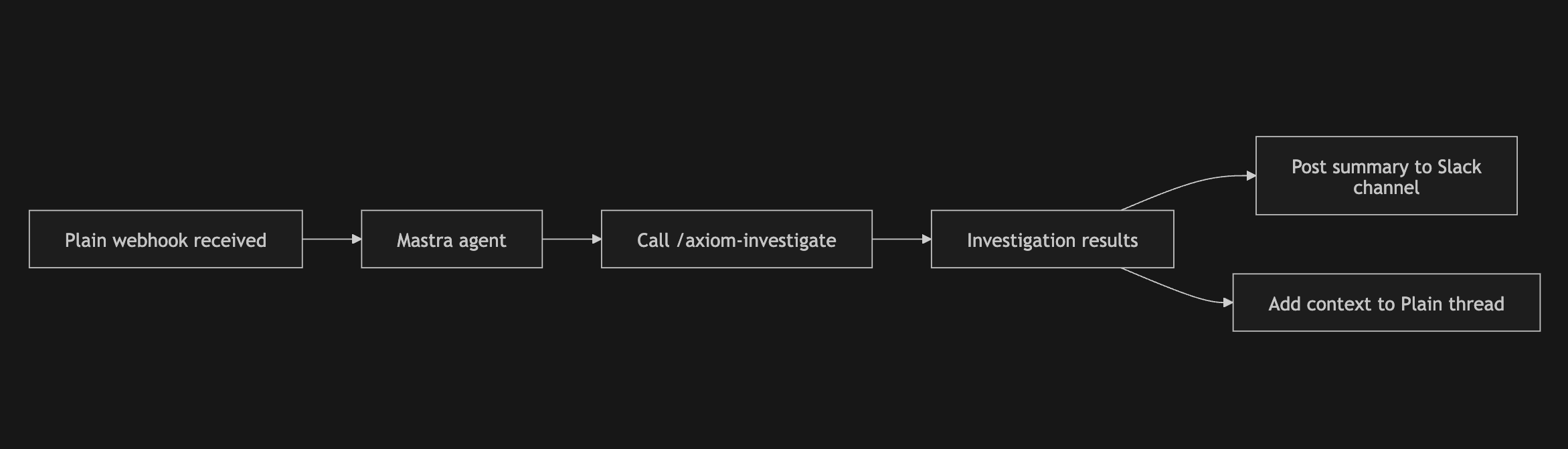
To be honest though, this version of the agent has mostly been useful for straightforward investigations. Once an issue requires deeper iteration, we usually fall back to running investigations locally in Claude Code instead.
### Where agents could improve
It's surprisingly difficult to fully replicate the local Claude Code environment in the cloud. Locally, we've already gotten to the point where even fairly involved bug fixes can be handled autonomously through a test-driven workflow. Recreating that reliably in a hosted agent has been much harder than expected though — MCP auth is flaky, skills don't seem to trigger correctly, and the overall understanding of our codebase feels noticeably worse. It's hard to pinpoint exactly where things break down, but the quality gap between local and hosted agents is still very real.
The interaction model also changes. With our autonomous support agent, we interact with it over Slack — agent investigates a ticket, posts results to Slack, and we then converse in a thread to dig deeper. However, in comparison to Claude Code or Codex, the slack interface just feels kinda clunky. There are a lot of "features" which aren't quite optimised, like agent thinking, tool calling, etc. At some point, the overhead of continuing an investigation over Slack becomes higher than just opening a new Claude Code session locally.
I suspect that the future would be about exposing functionality to existing harnesses like Claude Code or Codex, rather than rebuilding those interaction patterns from scratch. I haven't been able to quite visualise what this looks like yet, but I imagine in our case, it would be something along the lines of a Plain webhook triggering a cloud Claude Code session, which we can then continue on locally, etc. What I do know though, is that there's something really powerful about having a single harness with access to all the relevant tools and context.
---
# Internal agents are actually useful when you give them the right primitives
At Autumn, we experiment a ton with AI to try and speed up internal workflows. A lot of things we build don’t stick, but the ones that do sometimes feel like magic. One interesting pattern I’ve noticed is that these work because they give agents the right abstractions to operate on.
We're sharing what works for us so that others can do similar internally, and also help people build better agent products.
## Automating migration scripts
A good example of this is an internal scripting framework we’ve made a lot of progress on recently. We write a lot of scripts to help our customers perform batch actions and unblock them from any limitations on our API. To give a simple example, we might help with a promotional event by granting a free month to all of our customer’s users. In the beginning, following the mantra of “doing things that don’t scale”, this was done manually — hand written and locally run.
While this worked for a while, as our customers grew and requests got more complex, things started to break. Soon, we were writing scripts that operated over millions of customers, with added complexity around checkpointing, dry runs, retries, and recovery. You can imagine this doesn’t work very well on a local machine. Tools like [Trigger.dev](https://trigger.dev/) helped, and coding agents got really good too, but we still found ourselves spending weeks on these requests instead of building our core product.
Our first attempt at solving this was to build a web app which allowed us to perform the most common operations in bulk for our users. However, this didn’t work well because the types of requests we got varied wildly. Customers wanted things like tier merges or temporary upgrades across their entire user base, and we still found ourselves writing custom scripts for most cases.
## Giving agents the right primitives
We’ve tried automating our scripts with coding agents in the past, but it has never been effective. We tried to steer our agents to think like we do and give them an infinite playground of functions from our core codebase. It was never very effective though, as there were many mistakes being made and we often had to manually intervene.
The difference with our current tool feels like night and day though, and I believe the reason for that is that we invested time in the underlying infrastructure and abstraction which the agent is exposed to. With the scripting framework, we had deterministic yet flexible control (compared to a static UI) over the operations that the agent could perform, the interfaces it would need to learn, and the guard rails around it.
## /write-script
We've built an internal framework for scripting that looks something like Drizzle. The framework essentially built an abstraction layer over:
- Common operations we repeatedly performed in scripts — moving customers between plans, updating credit balances, adding new features, etc.
- Utilities for testing, dry runs, checkpointing, retries, and recovery
- The services these scripts interacted with, like Trigger.dev, Postgres, Stripe, and storage systems
To give you an idea of how this works, here is a basic script that would add a flag to a "Pro" plan, that gives access to "Premium Models"
```tsx
const addPremiumModelsScript = await script({
id: "add-premium-models",
org: ORG.id,
env: AppEnv.Live,
dryRun: true,
params: {
concurrency: 5,
limit: null as number | null,
},
run: async ({ s, ctx }) => {
const customers = await s.run(loadProCustomers, {});
await s.batch({
id: "add-premium-models",
items: customers,
output: "csv",
checkpoint: true,
concurrency: ctx.params.concurrency,
limit: ctx.params.limit,
fn: async ({ item: customer, ctx, s }) => {
const result = await s.run(addPremiumModels, { customer });
ctx.logger.set({ status: result.status, featureId: result.featureId });
return result;
},
});
},
});
```
We then compiled the knowledge of how to use this framework into a bunch of agent skills, and just like that, we found ourselves one-shotting these scripts with a single `/write-script` prompt to Claude Code. We made scripts both faster to write, and more robust too by building on the right abstractions. We now use this multiple times per week.
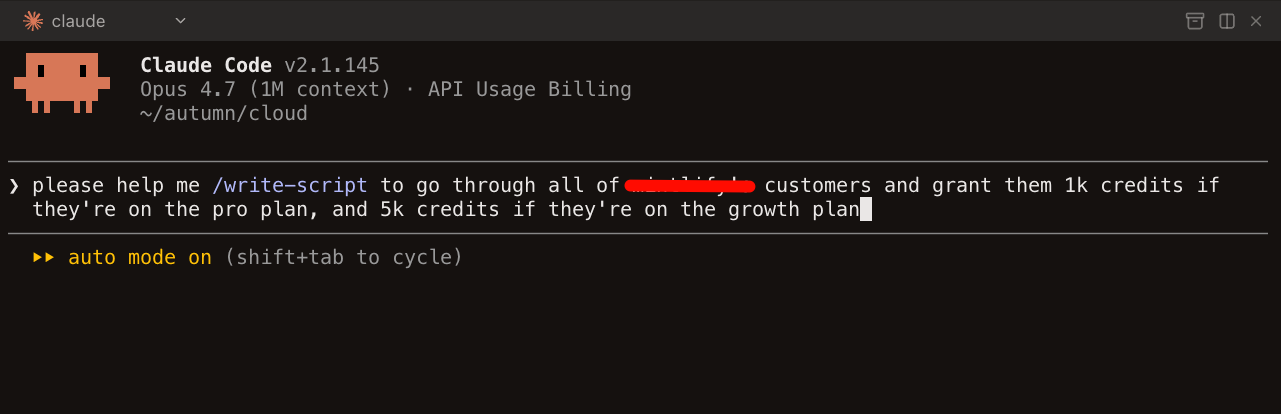
Here's our full /write-script skill to give you an idea of the primitives we created:
````mdx
---
name: write-script
description: "Write a new scripts-v2 script. Use when asked to create, write, or scaffold a script that interacts with Autumn DB, Stripe, or customer data."
---
# Write a scripts-v2 script
> **Background on Autumn's data model.** For general Autumn domain concepts — FullCusProduct shape, the three item categories, prepaid pricing, entity-level vs entity-scoped — see the skills under `ai/config/skills/autumn/`. Read the relevant one (e.g. `customer-products`) BEFORE writing any script that mutates customer products, prices, or entitlements.
>
> **Stripe resource creation.** For helpers that create Stripe prices/products/meters tied to Autumn prices (idempotent, V1+V2 prepaid pairing, volume-tier shape), see `ai/config/skills/autumn/stripe-resources`. Read it BEFORE writing any catalog migration that touches Stripe.
>
> **Shared utility functions.** For the naming conventions (`is*`, `To`, `enrich*`, `find*`, `filter*By*`) and folder layout of `autumn/shared/utils/`, see `ai/config/skills/autumn/shared-utils`. Check it BEFORE writing inline `array.filter(...).some(...)` or `array.find(... === id)` over Autumn objects — there is almost certainly an existing helper.
1. Read [PATTERNS.md](PATTERNS.md) to pick the right script category
2. Create a dedicated folder for the script under `runs/{org-name}/`
3. Copy [template.ts](template.ts) as the scaffold into that folder
4. Fill in config: `id`, `org`, `env`, `dryRun: true`, `params`
5. If the script needs non-trivial Autumn DB selection logic, use the `write-autumn-query` skill first
6. Implement `run` using `s.step()` for inline phases, `s.run()` for named step functions, `s.batch()` for iteration
7. For multi-file scripts, put Autumn candidate-fetching files in `loaders/`, define steps with `step()`, and compose with `s.run()`
8. Name the entrypoint file after what it does; do not use `index.ts`
9. Check [SERVICES.md](SERVICES.md) for available imports
10. For Google Sheets exports, read [google-sheets.md](google-sheets.md)
## Rules
- `dryRun: true` by default
- All tunables in `params` -- no CLI args, no scattered constants
- Use `ctx.logger.info()` inside batch fn, never `console.log()`
- Named object params everywhere: `fn({ db, orgId })` not `fn(db, orgId)`
- `ctx` extends `AutumnContext` -- pass directly to server functions
- Never name files `index.ts` -- name after what the function does
- Always put the script entrypoint in its own folder under `runs/{org-name}/`
- Follow the `autumn-query-conventions` rule for Autumn DB query structure
- Prefer a `loaders/` folder for Autumn DB selection/query files instead of scattering them across entrypoints or ad hoc folders
- Outputs route to local `data/` on laptop, S3 (`scripts-us-east`) on trigger.dev — never call `node:fs` directly. Use `stores: { ... }` (preferred) or `await s.data.*`. Sync with `bun fs pull|push` (default mirrors all dirs; prompts before overwriting). Batch checkpoints live at `state/checkpoint.json`; dry-run checkpoints live at `state/dry-run-checkpoint.json` only when `checkpointDryRun: true`. Use `params.only` to force specific items to rerun even if checkpointed.
- When iterating `ctx.products`, filter to the latest version per product id first — the catalog carries historical versions, and most catalog migrations only want the latest. A 7-line `keepLatestVersionOnly` helper that picks `max(version)` per `id` is enough.
- **Keep the entrypoint focused on orchestration.** No inline helper functions, ad-hoc types, multi-line filter/map blocks, or detailed `ctx.logger.info` lines at the top level. Move them to `utils/` (or `steps/` if the work is a named phase). The entrypoint should read as a sequence of `s.run` / `s.batch` calls plus `params` / `stores` config — anything that takes more than 2–3 lines belongs in a sibling file. If the user asks for a log line or extra branching at the top level, put it in `utils/.ts` and call from the entrypoint.
## One script vs split audit + delete
Default to **one script** with `dryRun: true`. The dry run lists the targets in the `processed` CSV + per-item logs; flipping to `dryRun: false` mutates the same set. No separate audit step needed.
Split into `audit-*.ts` + `delete-*.ts` only when the work is complex enough to be bug-prone — e.g. the delete set depends on human review of the CSV, selection logic is expensive and should be frozen, or the audit has multiple output buckets (`for-script` / `not-for-script`).
When splitting, put both scripts in one folder sharing `config.ts`, `loaders/`, `steps/`:
- Folder name describes the task (`topup-blocks/`, not `audit-topup-balances/`).
- Each script is a top-level file with a searchable name mirroring the folder (`audit-topup-blocks.ts`, `delete-topup-blocks.ts`) — never `audit.ts` / `run.ts`.
- Each script keeps a unique `id` (logs only, decoupled from data folder).
- Siblings share ONE auto-detected `data/` folder. Downstream script reads upstream CSV via `${import.meta.dir}/data/outputs/.csv`.
- `dataDir` is an optional subdir under the script's own `data/` — rarely needed.
## step() + s.run() pattern (for multi-file scripts)
- Use `step({ id, run })` to define named phases of work with typed input/output
- Use `s.run(step, payload)` to execute -- ctx and s are auto-injected, caller only passes business params
- Orchestrators (steps that compose other steps) take `s` in their run function
- Leaf steps take only `ctx` + business params -- no `s`, no `data`, no mutation
- Utility/helper functions stay as plain functions, no `step()`
### Step-as-folder for multi-helper steps
When a single step grows past ~80 lines or starts pulling in 3+ named helpers, **promote it from a file to a folder**:
```
steps/
├── simple-step.ts # one-file step is fine when it's lean
└── complex-step/
├── complex-step.ts # the entry — exports the step({ ... })
├── identify-X.ts # selector / matcher
├── build-Y.ts # construct outputs (no DB)
└── apply-Z-mutations.ts # DB writes guarded by ctx.dryRun
```
Rules:
- The folder name MATCHES the entry file (`complex-step/complex-step.ts`) — searchable; never `complex-step/index.ts`.
- Each helper is a focused single-purpose file (`identify`, `build`, `apply`, `validate`, `summarize`). Avoid `utils.ts` / `helpers.ts` catch-alls.
- Other steps import only the entry (`./complex-step/complex-step`), never the helpers.
- This applies the same logic as the `loaders/` and `utils/` folders: keep the entrypoint focused on orchestration.
## Batch logging with `ctx.logger.set()`
Inside a batch fn, use `ctx.logger.set()` to build up per-item context that shows what happened. This is the primary per-item output — it produces a JSON block per item showing business-level detail (customer ID, email, mutations, skip reasons, etc.).
```typescript
fn: async ({ item: customerId, ctx, s }) => {
const customer = await loadCustomer({ ctx, customerId });
ctx.logger.set({ customerId, email: customer.email });
const result = await s.run(processCustomer, { customerId });
ctx.logger.set({ status: result.status, updates: result.stripeUpdates });
return result;
},
```
**Rules:**
- Always `ctx.logger.set()` the item identifier and key business fields early
- Add mutation details (what will be added/deleted/changed) so the output shows the plan
- Inner step start/end markers are suppressed by default in batch items — `ctx.logger.set()` replaces them as the primary output
- Set `verbose: true` on the batch to see inner step markers for debugging
- `ctx.logger.info()` still works for freeform log lines alongside `.set()`
## Formatting
- **Always run `bunx biome check --write` on all new/modified script files before finishing** — `format` only handles whitespace; `check` also applies import-organize, so the user's save-on-format is a no-op.
## Result convention
- Functions return typed data -- never mutate caller's objects
- Fallible steps return `{ ok: true; ... } | { ok: false; reason: string }`
- Caller checks `result.ok` to decide how to handle
- Batch `fn` returns the full typed item result
- Use `onResult` when the collected output row should be different from that result
````
## /axiom-investigate
Another lifesaving usecase is for our logging infrastructure. Internally, we have a skill called `/axiom-investigate`, which we use to debug customer issues by asking an agent to query and search our logs in Axiom, our logging provider. For instance, when we get a slack message, like this:
> This user subscribed to a plan with the Stripe Link method, but now auto top-ups aren't working for him. Do you know why this is happening?
We can just do this:
```bash
please /axiom-investigate this thread for the org 'X':
https://autumnpricing.slack.com/archives/C0ALUV7GGGZ/p1779295652238089
```
It’s hard to overstate how impactful this skill has been. The time it takes to investigate issues has probably dropped 10x. Even our CEO, who had never touched Axiom before, now uses this skill daily.
This skill has been so effective (aside from the fact that we don’t sift through 100s of log lines just for a single issue), is because the results from the agent are highly accurate.
I think the reason this works so well is that we’ve spent a lot of time and effort into ensuring our logs are well structured with the right signals needed to debug issues, making querying and debugging a very repeatable process. For reference, the strategy we adopt is very similar to the concepts mentioned [here](https://loggingsucks.com/).
We never did this because we knew that we’d be able to use a coding agent over it — this was well before Opus 4.5 came out and long running tasks were the norm. It was simply because logical errors are more common as a billing company. However, because our logs are so structured, our agent has all the right primitives to deliver quick and accurate investigations.
Here's the full skill:
````mdx
---
name: axiom-investigate
description: "Investigate support tickets and debug customer issues using Axiom logs via the user-axiom MCP. Use when asked to investigate, debug, check logs, diagnose billing (attach, upgrade, cancel), entitlements (check, track, balance, rollover), or any customer issue."
---
# Axiom Investigation
## MCP tools
Use the `user-axiom` MCP server:
- `queryDataset` -- run APL queries. Accepts `apl`, `startTime` (default "now-30m"), `endTime` (default "now").
- `getDatasetFields` -- list all fields in a dataset. Use to discover schema before querying.
Always restrict `startTime`/`endTime` to the smallest range that covers the incident.
## Query precision rule
Never use `search` unless absolutely necessary. Broad search scans every field across many rows, which is slow, expensive, and usually less precise.
Prefer structured filters on fields like `context.customer_id`, `context.org_slug`, `req.url`, `stripe_event.*`, and `workflow.*`. When listing requests, add `isnotnull(statusCode)` so you fetch the one result log per request instead of every internal log line for that request.
## Dataset
All server logs go to the **`express`** dataset via `@axiomhq/pino`.
## Field reference
Every log line has standard Pino fields plus structured bindings:
| Path | Fields | Description |
|------|--------|-------------|
| `context.*` | `org_id`, `org_slug`, `env`, `customer_id`, `auth_type`, `user_id`, `user_email`, `api_version` | App context -- org, customer, auth |
| `req.*` | `id`, `name`, `url`, `method`, `body`, `query`, `user_agent`, `ip_address`, `timestamp` | Request metadata. `req.id` is the trace ID for correlating logs within one request. |
| `stripe_event.*` | `id`, `type`, `object_id` | Stripe webhook event context |
| `workflow.*` | `id`, `name`, `payload` | Background worker/job context |
| (top-level) | `msg`, `level`, `statusCode`, `durationMs`, `res`, `extras`, `error`, `done` | Per-log-line fields |
**`level`** values are uppercase strings: `DEBUG`, `INFO`, `WARN`, `ERROR`.
**`extras`** is a JSON object with domain-specific data (billing plans, webhook changes, etc.). Parse with `parse_json(tostring(extras))`.
**`auth_type`** values: `PublicKey`, `SecretKey`, `Stripe`, `Worker`, `Vercel`, `Revenuecat`.
## Investigation workflow
### 1. Scope
Filter by `context.customer_id` or `context.org_slug` plus a time range. Always start narrow.
### 2. Find the incident window FIRST
Heavy queries over wide ranges time out. Run a cheap aggregate first to locate WHEN, then a focused query in a tight window.
**Pass A — cheap, wide.** `summarize` over `bin(_time, ...)`, ≤3 columns:
```
['express']
| where ['context.customer_id'] == 'CUSTOMER_ID'
| summarize errors = countif(level == 'ERROR'), total = count() by bin(_time, 5m)
| sort by _time desc
```
**Pass B — heavy, narrow.** Use MCP `startTime`/`endTime` to bound to ≤1h around the bucket Pass A surfaced. Use `parse_json`, joins on `req.id`, etc. Skip `project` — pulling the full row keeps debugging interactive (you don't have to re-run when you realize you need another field). Skip `sort by _time asc` too — Axiom's natural order suffices. Only add an explicit `sort by` when you genuinely want the OPPOSITE direction (`desc` for newest-first browsing).
If Pass A is empty, widen Pass A or change the predicate — don't run Pass B. If Pass A finds multiple buckets, run Pass B once per bucket.
### 3. Triage
Inside the narrowed window, look at errors and warnings first (`level == "ERROR" or level == "WARN"`), then broaden to INFO if needed.
### 4. Trace
Use `req.id` to follow a single request across all its log lines. Use `stripe_event.id` to trace a webhook through its handlers.
## Query templates
**All logs for a customer in a time window:**
```
['express']
| where ['context.customer_id'] == 'CUSTOMER_ID'
| where ['context.org_slug'] == 'ORG_SLUG'
```
**Errors/warnings for a customer:**
```
['express']
| where ['context.customer_id'] == 'CUSTOMER_ID'
| where level in ('ERROR', 'WARN')
| sort by _time desc
```
**Stripe webhook events for a customer/org:**
```
['express']
| where ['context.org_slug'] == 'ORG_SLUG'
| where isnotempty(['stripe_event.type'])
| sort by _time desc
```
**Worker job failures:**
```
['express']
| where isnotempty(['workflow.name'])
| where level in ('ERROR', 'WARN')
| sort by _time desc
```
The omitted `project` is intentional — pull the whole row so you can pivot mid-investigation without re-running. The omitted `sort by _time asc` is intentional — Axiom's natural order is fine; only add `sort by _time desc` when you specifically want newest-first.
## Never use `search` unless absolutely necessary
Only fall back to `search` if (1) the identifier has no obvious structured field, AND (2) the time window is ≤1h. Otherwise: query a structured field, or use Pass A to find the time bucket first, then narrow.
## Share URLs (when user asks to verify)
Axiom org slug: **`autumn-cxdq`**.
Build a clickable explorer URL with the `initForm` param so the user lands on the same query:
```
https://app.axiom.co/autumn-cxdq/query?initForm=
```
where `` = `encodeURIComponent(JSON.stringify({ apl, queryOptions: { quickRange } }))`. `apl` is the full query (start with `['express']\n...`); `quickRange` is `15m` / `1h` / `24h` / `7d` / `30d` / `90d`.
Generate via Bash to avoid encoding mistakes:
```bash
node -e "const q={apl:\`['express']
| where ...\`,queryOptions:{quickRange:'7d'}};console.log('https://app.axiom.co/autumn-cxdq/query?initForm='+encodeURIComponent(JSON.stringify(q)))"
```
Default to `quickRange` covering the incident window. Whenever the user asks for a query URL or wants to verify a finding, output the URL using this method.
## Domain-specific guides
Read these when the investigation falls into a specific domain:
- **Billing** (attach, upgrade, downgrade, cancel, payment, checkout, auto top-up): read [billing-investigation.md](billing-investigation.md)
- **Entitlements** (check, track, balances, rollovers, `allowed`): read [entitlement-investigation.md](entitlement-investigation.md)
- **Stripe Webhooks** (subscription lifecycle, invoice payment/failure, checkout, schedule changes, customer timeline): read [stripe-webhook-investigation.md](stripe-webhook-investigation.md)
- **Redis slow commands** (latency, cache perf, SLO breaches, V2 FullSubject cache): read [redis-slow-command-investigation.md](redis-slow-command-investigation.md)
- **Infrastructure** (worker queues, rate limiting): _coming soon_
````
## Final thoughts
Incidentally, Autumn itself happens to fall into this category of tools: systems that create this abstraction layer, which I believe is best described as an interface which allows humans and agents to work together more effectively.
It’s an abstraction layer representing your application's pricing and billing state, and we’ve spent a lot of time designing it to be flexible, but intuitive. As a result, coding agents interact with billing systems much more effectively.
For instance, sales teams can update deals, grant entitlements, or manage customer billing schedules directly from Slack. GTM teams can make entire pricing changes and migrations without ever involving engineering.
This wasn’t something we thought about when we first started Autumn, but it’s definitely why we’re more bullish than ever on what we’re building.
---
# Migrating Autumn to PlanetScale
Autumn is a next-generation billing infrastructure platform for AI companies, helping them manage credit systems and AI token usage around real-time access checks and consumption, as well as making pricing models and pricing changes much more flexible. Since we’re often in the critical path of our customers’ products, we’re not just processing billing in the background, we’re helping decide in real time whether a user can make an API call, generate output, or consume more credits. That makes low latency and high uptime core product requirements for us, not just nice-to-haves.
## Issues with our old database
With our previous database provider, we encountered several clear issues with relying on them as a critical piece of infrastructure. In particular, these were the largest pain-points:
- Issues with connection pooling scalability and reliability
- No zero-downtime upgrades
- Query latency was both higher than we’d like, and inconsistent over time
These issues led us to search out other solutions. PlanetScale offered what seemed like a clear solution to all of these problems. They are known for performance with PlanetScale Metal, and have a reputation for great availability and scalability.
## Migration was easier than expected
Migration was much easier than we had anticipated. We were worried it’d take us weeks, but it ended up taking only 2 days.
Initially, we tried to set up the replication manually and when we faced issues, the PlanetScale support team jumped on super quick to help guide us through the entire process.
The Planetscale migration team directed us to use their custom fork of pgcopydb. This tool made the process much simpler and faster, and everything worked smoothly from here on out. Using the tool, we copied the data, ensured we were ready for a cutover, and then made the switch. All with only seconds of interim downtime.
## What changed for us after switching
After migrating to PlanetScale Metal, our query latency was so low that it was honestly pretty shocking. It was nearly an order of magnitude faster than before. Previously, we were seeing our queries take ~100ms, and after moving to Planetscale it was consistently < 10ms. Not only was the latency itself much lower, but PlanetScale gives you deep visibility into query latency via Insights, both in aggregate and at the per-query level.
All the previous issues we had were addressed and more. Connection pooling is no longer a bottleneck, and we can now comfortably push for more connections as we grow. Upgrading / downgrading is really simple, with just a few clicks of a button to resize out instances.
## More than just speed — the whole DX
Planetscale has been so good that we barely have to think about our DB infra anymore. Post-migration, our favourite tool has to be the Insights page. At this point, it’s already saved us from several outages. We recently had an incident where our alerts were firing for elevated response times, and we quickly noticed our DB was at 100% CPU. Using insights, we were able to determine the query causing the issue within minutes and block that particular query in our app. If we hadn’t had the level of visibility PlanetScale provides, we would’ve likely had an outage.
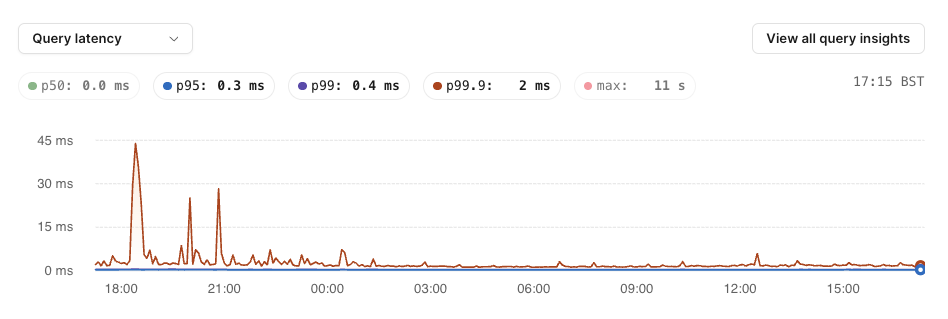
The anomalies page has also been an insane help. We recently onboarded a large customer whose huge scale revealed several holes in our schema. We were immediately able to notice this through the anomalies page showing that several queries were scanning a ton of rows and using more CPU than necessary, and we quickly added the necessary indexes to fix.
Planetscale is also very agent friendly when it comes to infra because we’ve connected our agent to Planetscale insights via the MCP server many times to debug slow queries!
## The support has been unreal
Planetscale’s support team has been amazing. Response times are always quick: within hours, and sometimes even minutes. This is quite impressive, especially given we’re not on any business support tier (we’re using a self-served Planetscale Metal database).
In the past month, we’ve had especially amazing support from the team, in particular one of their Postgres engineers, Joao. When we told him we were onboarding a new large customer and were worried about DB performance, he went and debugged our queries for us. While doing so, he noticed that our most used query (which probably accounts for 80% of database requests) was not using the right indexes, and performance could be improved by about 10x.
The support here was truly unexpected as I never thought he’d actually go and debug, and furthermore help us rewrite the queries. But following his advice, we were able to reduce our CPU usage from 40% to < 10%, and the p99 for that query dropped from ~200ms to < 50ms.
The next time Joao offered insane support was when we did a table migration on a Sunday which impacted our app. Not only was it a weekend, but it was also his birthday, and he immediately jumped on for ~1 hour to help us fix the issue. Without his help that day, we would’ve probably had a catastrophic incident.
## Impact on Autumn
Planetscale has been amazing for us on all fronts. Latency is better, reliability is excellent, and amazing support. We now don’t need to spend as much time debugging database issues. Can’t recommend it enough to anyone!
---
# Post-mortem: Database outage caused by collation migration locking conflict
On Sunday March 15, 2026 from 15:00 to 16:15 GMT, approximately 10% of API requests to Autumn failed due to a database outage caused by a collation migration on our production database.
## Timeline
- **~15:00** — Collation changes applied to `customer_entitlements` and `customer_products`. DB CPU spikes, queries begin failing.
- **15:05** — Issue identified. Attempted rollback via `ALTER TABLE` but blocked by active queries holding locks, causing repeated deadlocks.
- **15:20** — Attempted code-level fix: updated the main customer query to explicitly cast collation, hoping to force index usage without a schema rollback.
- **15:48** — With help from PlanetScale support, shut down all application connections, reverted collation changes, and ran `ANALYZE` to rebuild planner statistics.
- **16:15** — Full recovery confirmed across both regions. All APIs and dashboard operational.
## What happened
We were optimizing our most frequently run queries and discovered that several indexes weren't being used due to a collation mismatch between parent and child tables (customers.internal\_id uses COLLATE "C" for KSUID ordering, but FK columns like customer\_entitlements.internal\_customer\_id used the default collation). Postgres can't use indexes across this mismatch, so our most frequent query was taking ~150ms when it should have been <10ms.
After changing the collation on customer\_entitlements, we saw CPU drop by 30% and much faster query times. To prevent this issue in the future, we decided to align collations across all related tables. There were 4 tables to change, in this order:
1. customer\_entitlements
2. customer\_products
3. entities
4. customers
After changing collation on the first two tables, our main query's performance dropped dramatically due to missing indexes, and this made our DB CPU spike and queries fail. We tried to reverse the changes, but the ALTER TABLE needs an exclusive lock on the table, and there were always active queries holding locks — causing repeated deadlocks.
## Resolution
We first tried to push a code-level fix (aligning collations in the query SQL itself), but this didn't take effect fast enough with the DB under heavy load. Ultimately, we shut down all application connections, reversed the collation changes, ran ANALYZE to rebuild planner statistics, and restarted. Queries returned to normal immediately and CPU leveled off.
## Prevention & Remediation
All future column/schema migrations will be done using the duplicate-dual-write-cutover pattern. Instead of altering a column in place (which requires an exclusive lock and a full table rewrite), we create a new column with the desired type, dual-write to both columns, backfill existing rows in small batches, create indexes concurrently, then cut over.
More generally, we will be adding a status page to improve transparency when we have issues. We are also considering making a change to our `check` and `track` SDKs that would enable them to fail-open by default, so that in an outage there is no disruption to paying customers.
---
# Consumer psychology is important in AI pricing (feat. T3 chat)
[T3 Chat](https://t3.chat/) is the best alternative to AI apps like ChatGPT and Claude, created by [YouTuber Theo](https://www.youtube.com/@t3dotgg) and co-founder Mark. It gives you access to all the latest AI models in one place, is a beautifully designed product and has become my daily-driver for AI. It was no surprise to me that they have several 10s of thousands of subscribers.
Initially, the subscription gave access to 1500 "standard" messages, and 100 "premium" messages per month, where premium messages were reserved for more expensive models. We helped them move to a multi-tier, waterfall rate limits model.
It was a pretty interesting insight into the psychology behind how AI products are consumed and what that means for monetization.
### FORO
The first reason behind the change is to address what Theo calls "fear of running out". Whenever users hit enter to send a message to T3, there's a latent anxiety that comes with watching your usage counter slowly tick up.
Almost no users ever hit their limit of 1500 messages, but that didn't really matter -- they were paranoid that they would.
Similar to a video game where you hoard your items til the final boss, users would subconsciously attempt to ration their usage for the month, in case they needed it. The feeling of being limited was often cited as a reason that a user didn't convert.
With the new pricing model, users now have a bucket of usage credits that replenishes every 4 hours. You either use it or lose it, making you feel less guilty about consuming it. If your quota runs out, you simply wait a few hours before coming back.

### Prepaid credits > metered pricing
Economically, prepaid credits and metered billing can be identical. A user might consume $6 worth of AI in a month either way. But the experience of spending that $6 is completely different.
With metered pricing, every message feels like a purchase decision. Users are constantly running a background cost-benefit analysis: "is this prompt worth it?"
Prepaid credits flip this. Once the money is spent, using the product stops feeling like spending and starts feeling like redeeming. It becomes "I should use what I've already paid for."
Replit is a great example of a company that just made this change, introducing prepaid credit tiers in their latest pricing change.
Metered is still great for predictable, infrastructure-level usage (cloud compute, API calls at scale) where buyers are sophisticated and want to pay for exactly what they use. But for products where you want users to engage freely and habitually, prepaid credits seem to have become the preferred billing method.
### Variable usage patterns
Users will often send messages in short, frequent sessions. In these cases, each session only uses a small number of tokens.
Other times, usage can be more "bursty", when working on a bigger task. If the 4 hour quota was the only available option, this type of usage would be often interrupted and users would need to wait.
To get around this, some of the monthly quota is assigned to a monthly overage bucket. If a certain session uses more than the 4 hour limit, it will start drawing from this bucket instead.
The challenge with moving to this model was previously, users were able to by lifetime top-up messages, and we needed a way to still honor this purchase. As part of the migration, we converted these prepaid top-up messages into a standalone credit balance that lasts forever. This bucket of messages will be drawn from last in the waterfall.
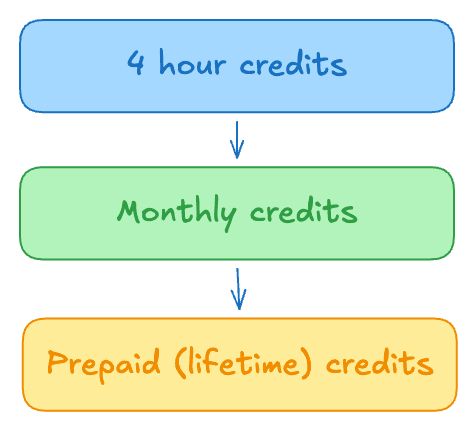
[OpenAI's billing system](https://openai.com/index/beyond-rate-limits/) for Codex and Sora works in a very similar way. The team also added a "premier" tier for $50, with 10x more usage, better suited for power users that were previously purchasing multiple top ups.
### Unpredictable costs
Messages are not created equally. Each would consume a fixed quota, but the underlying costs would vary dramatically depending on the input context. Some user behaviors were painfully expensive:
- Dumping many files from their codebase into the chat
- Using expensive models to analyze PDFs and images
- Continuing long threads with expensive models, instead of starting new ones
Any of these actions could cost several dollars each and a small (but regular) proportion of the user base ended up being seriously unprofitable.
The team switched to a credits system. Every model and action (eg web search) has an underlying credit cost associated with it.
When a message is requested, an estimated number of credits for that message is prematurely deducted from the user's balance (ie, reserving balance). After the message is completed, an adjustment event is sent to either refund (if the estimate was higher) or capture additional credits (if the estimate lower). Reserving credits before the message is sent protects against overconsumption.
A secondary benefit of this system is that users can now use premium and basic models as they wish interchangeably.
### How Autumn helped
Before using Autumn, the team had followed [Theo's viral guide](https://github.com/t3dotgg/stripe-recommendations) on how to manage Stripe. Subscription statuses and balances of messages were stored in a Redis instance that ran on upstash. Even though it's the easiest setup to manage, they were still dealing with race conditions around failed payments and race conditions.
With the increase in complexity of the new pricing model, they decided that they didn't want to be slowed down by billing anymore. Using Autumn meant they didn't have to deal with stripe code, webhooks, waterfall credit deduction, cron jobs, cache layers, failed payments / 3DS, etc. All while having full flexibility to change their rate limits at any point, without code changes or migrations.
> Stripe is a hassle. It's an amazing platform with a lot of capability, but with that capability comes a ton of little details that you have to manage.
>
> Autumn ticked all of our boxes and allowed us to consolidate a bunch of services into one place, and with a team we trust to know the intracacies and do it right.
>
> We were spending nearly as much on the infrastructure to handle this ourselves (less well) than the cost with autumn. It makes the switch even more of a no brainer.
\-Mark (T3 Chat Co-Founder)
### Thinking about doing something similar?
The specific limits and buckets will still be refined, but having used it myself over a couple weeks, it really does feel great to use and is more profitable for the company. To build a similar model:
1. Define the average margin per user you're looking to make, and how many credits a user can use each month to hit that. Eg, to make $2 on a $8 sub, you have $6 of credits an average user can use.
2. Allocate ~30-50% of those credits to the monthly overage bucket
3. With the remaining, divide them across the average number of sessions a user has in a month
This will give you a good place to start. Your users will very quickly tell you how they feel about it, and you can refine it from there.
---
# We're making some API changes
Over the last year we learned a lot about how you use Autumn. We have noticed which pain points come up repeatedly and where users face limitations. Our v2 SDK will soon be released in beta, which we think offers a more intuitive and flexible experience as you build on Autumn.
**There will be no breaking API changes:** everything is versioned on our end and your current version will continue to be supported.
### What’s changing?
**New objects / types.**
Our customer and plan objects are changing to better suit our abstraction:
- Any reference to `product` is now `plan` to better reflect our abstraction
- Customer products are now split into `subscriptions` and `purchases` for easier access
- Features that a customer has access to will now be under a `balances` object
- Subscription status can now only be one of `active`, `scheduled` or `expired` - with additional params to determine trialing, canceled and past due states
- Types are more consistent (eg, consolidation of `one_off` and `lifetime` intervals)
**Attach is being split**
Today, the `attach` function is used for any operation that changes subscription state — checkouts, upgrades, downgrades, quantity updates, trial updates etc. This has become unpredictable to work with for you guys, and almost impossible for us to maintain. Adding functionality in one flow almost always breaks another.
We’re splitting this into 2 functions: `attach` will be used for operations that result in a plan change (checkout, upgrades etc), and `update` will be used for operations that update an existing customer subscription (cancelations, quantity adjustments, trial adjustments).
We know API changes are annoying, but we're biting the bullet now to set ourselves up for better stability in the long run. Again, your existing integrations will not break and we will continue to support the current version. For those of you that want to upgrade, we’ll be providing a short prompt/skill for Claude that can migrate your code for you.
As part of this, we’ve refactored a lot of code, which has allowed us to release a lot of new functionality and configurabilty. More details on that soon. Thank you all for helping make Autumn better ❤️🔥
---
# People really don't like metered billing
Replit announced a big pricing change recently, and it put words to a few patterns I’ve been noticing across AI-first products. TL;DR:
- As agents run longer and more autonomously, pricing gets harder.
- People don’t like usage-based billing because they can’t predict it.
- Per-seat pricing doesn’t map cleanly to AI value.
From this mess, the pricing model that has prevailed is the "credit": a pre-purchased token for "work".
## Users hate usage-based billing
Usage-based billing is “fair” in theory. You pay for what you use. In practice, especially for UI-first products, it creates background anxiety.
Every click feels like it might cost money, so you explore less, and subconsciously pause before taking each action. You feel out of control of your end of month bill.
This is why you keep seeing products move away from metered billing and more towards **prepaid credits** (a monthly bucket, and usually one-off packs on top). It doesn’t necessarily change the underlying economics, but it changes the product experience: controlled spend with a hard cut-off.
Even in APIs / infra, where usage-based has been the standard, we're seeing auto-topups replacing pure usage-based (OpenAI being a good example).
The direction of travel is the same: when AI costs are high and variable, predictability and hard-limits are necessary.
## Per-seat pricing is basically dead for AI-first products
Replit’s new Pro plan reflects this shift. Instead of $40/seat/mo, they've introduced a team-wide pool of credits, with a seat/collaborator cap (up to 15 builders).
Even for something like Cursor, where the price on their site is displayed "per-seat": what you're _actually_ paying for is the $40 USD of AI usage per-month that come with the seat -- not the seat itself.
In traditional SaaS, seats are a decent proxy for value. More people using the tool generally means more value. In AI-first products, the marginal value often isn’t “another seat.” It’s:
"how much work can the model/agent do for us?"
Replit has also brought “real collaboration” into Core (up to 5 people), and they’re sunsetting the old Teams plan. Importantly, this it’s a product strategy move:
- Bake collaboration into the default experience.
- Make “usage” the thing you sell, rather than individual power users.
- Put a cap on seats, but make the variable—and the real value—how much work gets done.
## Pricing is getting less transparent as agents run longer
The more autonomous agents become, the harder it is to keep pricing legible. Replit is a clean example.
> Simple tasks may cost less than $0.25, more complex tasks may cost more than $0.25
They used to charge a fixed $0.25 per checkpoint. Simple mental model that you could predict it. Now it’s "effort-based": you get charged _some random amount_ based on time + compute for the request.
Mechanically, this makes sense. Agent requests vary wildly: a tiny change versus a long-running debugging session are not the same unit of work. But UX-wise, it shifts the feeling.
And credits add a second layer of opacity. You see a credit balance, but the mapping is fuzzy. How do model tokens map to Replit credits? What’s the range for a “normal” request? What's replit's markup on the credits?
When your costs are unpredictable you need some way of passing it on to your customers. Credits are great because they can effectively grant users the same number of credits, or even double them -- but silently increase their margins however they want.
## What's next?
Credits will probably stick around for a while because they’re the best abstraction we have right now. But they also feel like a patch over the harder question:
How do you make AI spend feel predictable when agents can do wildly unpredictable amounts of work?
I would personally love to see more AI products prioritize **billing observability**:
- flat costs for simple tasks
- estimates _before_ you run expensive tasks (“this will be ~X credits based on history”)
- a receipt _after_ you run (“this cost X because **\_”)**
- ranges + forecasting (“at this pace you’ll run out on **\_”)**
That would make AI feel more like software and less like a casino. But my guess is that uncertainty will just become part of the new software contract.
---
# React vs shadcn, and trying to be too clever
You know those moments where you have an idea so brilliant you feel like Steve Jobs? Launching our component library felt like that. Novel, high risk, and a radically different approach to what was on the market. If it worked out, it'd be incredible.
Unfortunately, it didn't. We ended up with a weird mess and had to spend the last week rewriting everything.
_For context: we're building Autumn, pricing and billing software. Part of our offering is frontend components for things like a pricing table, paywalls etc. You can read more about them_ [_here_](https://docs.useautumn.com/quickstart/shadcn)_._
### **V1 as a React library**
We first attempted this as a standard npm React library:
```
import PricingPage from "autumn-js"
```
It's biggest issue was customisability**.** There are two ways to make npm components customisable: through props, or a no-code interface in our app.
1. With props there were too many class variables. For example with the pricing page, each pricing card is composed of many headers, descriptions, buttons and more. And each card itself can have variants (recommended, discounts, annual etc).
2. A low code interface is a bad experience for devs, who want full customisability and have 10x experience designing with tailwind/css. Even more so with the era of cursor. This is subjective but I’ve never had a good experience with one.
_Sidenote:_ If you ever try to make your npm component customisable via tailwind, all the best. That was one of the most frustrating days of our lives.
Also, If you ever forgot what jsx styles look like, here’s a snippet of what we had to write…
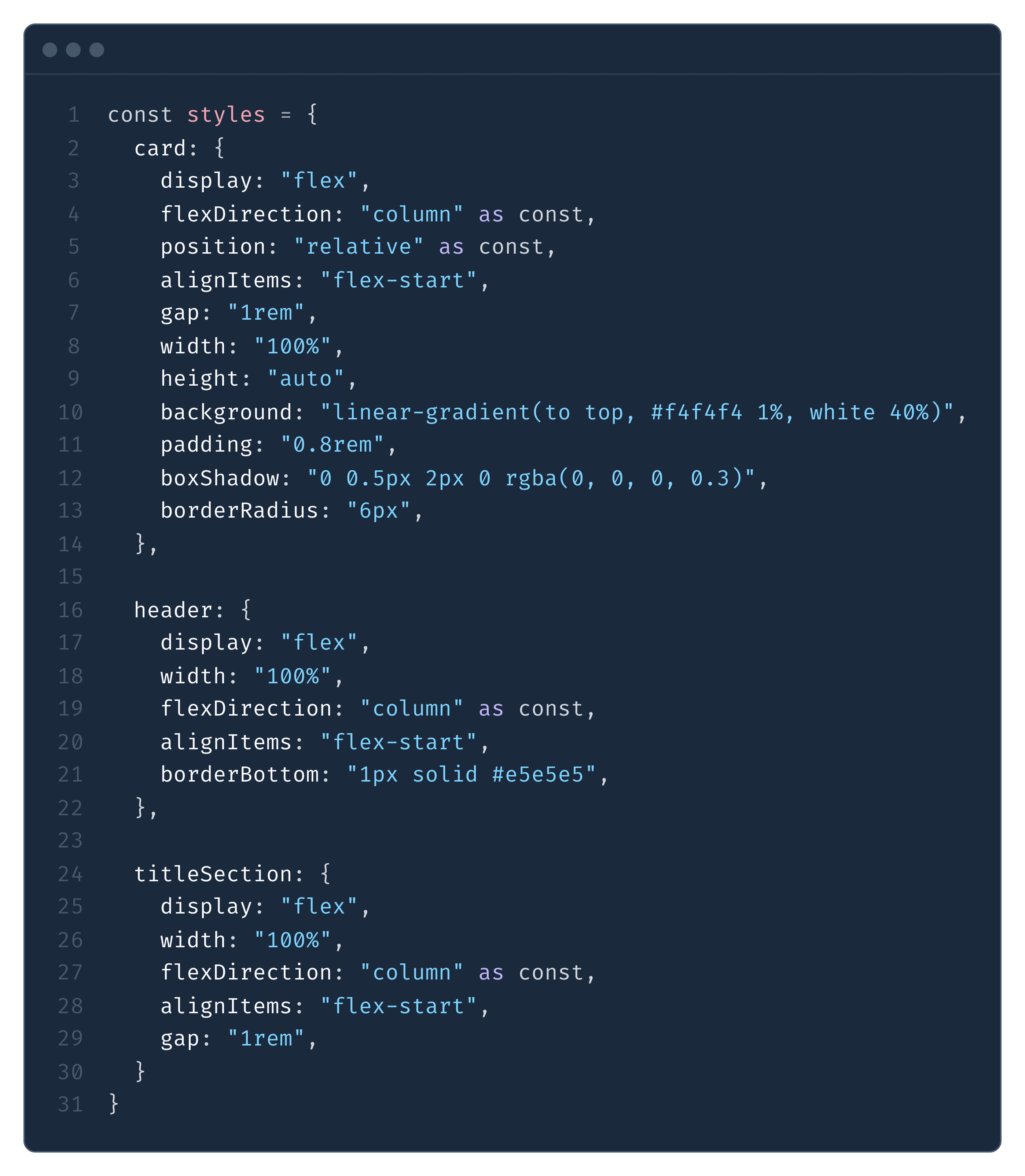
We made one measly post on linkedin about it, decided it was unusable and shelved it.
### **V2 as shadcn/ui components**
A few weeks later we started looking into it again with shadcn.
```
npx shadcn@latest add https://ui.useautumn.com/classic/pricing-table.json
```
This immediately felt like a more customizable and fluid DX, but had its own challenges:
1. Because shadcn components install as a user file, we cannot fully control it via our SDK. For example, if we wanted to trigger a modal/popup to confirm a plan upgrade, the user needs to explicitly pass it into a function. This does take away slightly from that “magical DX”.
```jsx
//upgrading to Pro tier