In the last couple of months, mentions of cloud agents have exploded. Everyone seems to be building a "software factory", presumably because 1) models are now so good that you don't have to review every line of code they write, and 2) the infra for running agents in the cloud has gotten much better. Cursor, Claude and startups are all investing a ton into it. Even Devin knows its time has come:

That said, there's a difference between an agent simply editing your code in a remote environment and one that truly lives and breathes in the cloud. One that feels like a teammate you can hand work off to and trust that it'll do it well on its own.
I think most companies are still pretty far from the latter, and the reason is that it's not just the models and infra that need to improve, but your own setup: dev environments, codebase, infra. Companies like Ramp and Stripe have internal labs building these out, which is why they're able to make huge claims around their internal agents: Inspect and Minions.
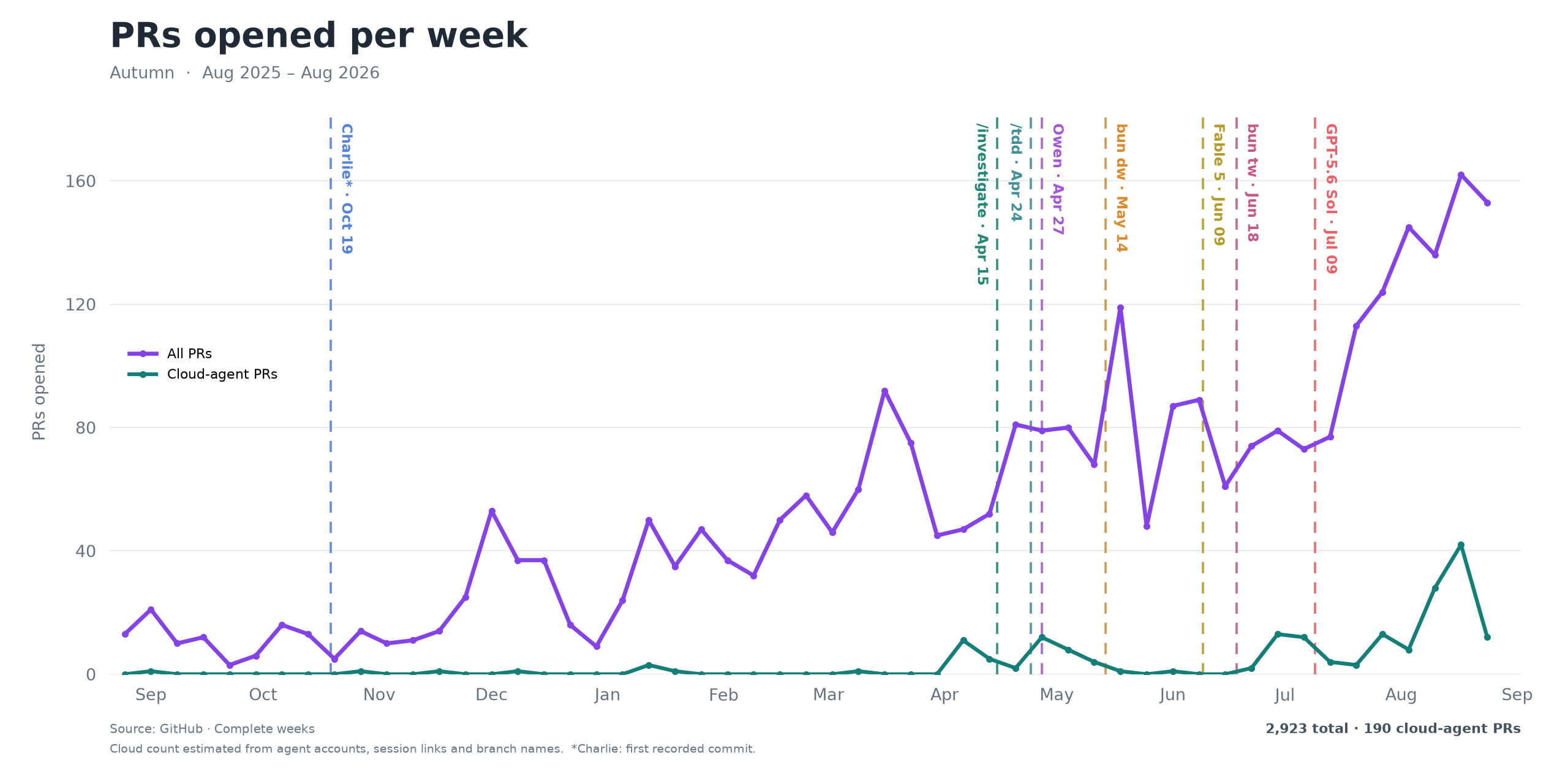
At Autumn, I think we're slowly starting to find our footing here, thanks to the work we've put in bit by bit over the past year. Here's a chart showing the growth of weekly PRs made, and more importantly, the proportion made by cloud agents. So I wanted to share the pieces which I thought were most crucial to enabling this.
Test driven development
If there's one thing to take away from this blog, it's test driven development. And I'm not talking about the flurry of unit tests that agents seem to spit out these days, but a well intentioned test setup built around your app and the flows you care about. Perhaps the best way to put it is giving agents an abstraction to "describe" your app's behavior in code, so that any feature that is shipped can be easily and accurately tested by the agent.
For us, testing has always felt particularly overwhelming and challenging for a couple of reasons:
-
Billing is extremely stateful. Depending on the current state of a customer, the same action could produce a number of different outcomes. For example, a customer could be on different plans, configured in many different ways (seats, usage limits, overages, etc.). And from there, any subsequent action (upgrade, downgrade, etc.) could result in many different outcomes.
-
We have a huge dependency on Stripe, and part of our testing is making sure that certain behaviors on their end work the way we expect, which means we can't just mock it. For example, when billing overages, we need to verify that Stripe lets us add the line item on the
invoice.createdwebhook, before the invoice is finalized.
Building an internal testing framework
We ultimately solved this by building an internal testing framework. The way it works is that we designed a set of primitives and fixtures which let us structure our tests in a way we felt was most appropriate to expressing Autumn's behavior: 1) initialize a customer in a particular state, 2) perform the action we want to test, 3) verify the outcome.
For example, say we wanted to verify that submitting overages to Stripe works as expected. The test would be designed like this:
- Setup: we first initialize a customer and put them on a product
prowhich has overages - Action: we then track usage such that they're in overage and advance the clock to the end of the cycle to produce an invoice
- Verify: we then verify that the customer's invoice includes the overage line item
The main takeaway here is that the time we spent ensuring that the way we wrote and ran tests was the most appropriate for our app has proven to be extremely effective and intuitive, not just for agents, but for ourselves too.
Infrastructure
With agents able to describe and test our app's behavior, the next step was setting up the infra for them to do this in parallel, and in the cloud. The first hurdle here was the classic worktree issue: how to give each agent its own isolated environment and, more importantly, its own set of services (DB, cache, etc.)
Giving each agent its own isolated environment
The difficulty here ultimately comes down to the services you rely on. For instance, if your app only needs the basics (DB, auth, etc.), your environment can be entirely defined in Docker. But once you start relying on services that aren't as easy to spin up locally (in our case, AWS EventBridge, Stripe, Trigger, etc.), things start getting a bit more complicated. Here's a diagram showing the environment architecture we spin up per agent:
Rather than going into the nitty gritty of how each service is set up (which the diagram above should give you a good sense of), I wanted to share some of the higher-level learnings we had as we built this out.
1. Deciding what actually needs to be isolated
Firstly, you don't need to isolate every single service. Some can be shared between environments, and the reason is that with most services, the data is usually already separated per tenant. Take Stripe as an example: each customer created in Autumn is linked to a unique Stripe customer, and different environments would never operate over the same Stripe customer. As such, there's no conflict there and a single Stripe account can be shared.
Another slightly more nuanced example is Tinybird (our analytics DB). Now, technically our tests reuse the same customerId, so running the same test in two environments could cause their events to clash. But heuristically, since we spend less than 10% of our engineering time on analytics (most goes into the core billing and entitlement logic), that overlap is unlikely. As such, we felt comfortable keeping Tinybird shared, and it hasn't caused any issues so far.
2. Code level exceptions to skip services that are hard to isolate
Sometimes, you need to isolate a service per environment, but there isn't an easy way to do so. In these cases, it may be best to simply implement code level exceptions.
For instance, we use Trigger.dev for migrations, and while it's technically open source, it felt too heavyweight to host separately for each agent, especially since it wasn't a "core" part of our stack. Sharing an agent caused issues as well though, since each environment could pick up another one's jobs. So to solve this, we basically made a code level fix which said: if you're in a cloud environment, run the trigger job inline:
if (shouldRunMigrationInline()) {
	await runMigration(payload);
} else {
	await runMigrationTask.trigger(payload);
}
The same migration runs either way; we're just changing how it gets executed.
Running integration tests at scale
The other challenge which we needed to solve infra wise was figuring out a way to run our integration tests at scale. Most of our tests at Autumn are integration tests, and each of these can take anywhere from seconds to minutes to run. So with the framework we came up with from before, our bottleneck shifted from writing the tests to actually running them. Before the work we did to speed things up, our core integration suite (which we needed to run before merging any meaningful change to main) consisted of ~400 tests and took about an hour to run.
To speed this up, we needed to find a way to run all of these in parallel, and if you haven't guessed it already, there's a pretty popular solution for this at the moment: sandboxes. Here's how it works:
-
We first find or prepare a warm snapshot of our app for a given branch: docker services spun up, dependencies installed, DB migrations applied and test data seeded. (fun fact: checking whether the lockfile had changed before running
bun installsaved 60 seconds on this step) -
Next, we spin up a pool of workers, each running its own copy of Autumn, with the pool size based on how many test files we're running. From our benchmarks, with the warm snapshot, we could get 40 workers running Autumn and its services in 29 seconds, with no startup failures.
-
We then distribute the test files across the pool, with each worker running up to three tests at once. A big issue we've had with our integration tests is that they can be flaky, especially the ones that verify Stripe behavior. To account for this, we retry each failed test file at most once, preferably on a different worker to reduce correlated failures.
-
Finally, as the tests run, we stream the results into a single dashboard. We shut down excess idle workers as the run winds down, keeping a small buffer for retries, and save the failure details so we (or the agent) can investigate without having to run everything again.
bun twWith this new setup, we brought down our integration test core suite run time from an hour to ~10 minutes. By the way, shout out to Tanvir for building this.
Tools and skills
The final piece which really enabled cloud agents for us was ensuring that our cloud agents had the right tools and skills. Any piece of work, whether it's a bug, QoL update, or new feature has context around it, and this can live in a number of systems: logs, Slack, DB, Tinybird, AWS, etc. For the agent to come up with the most appropriate implementation, it needs to have access to this context. This came in two parts.
Giving the agent access to various systems
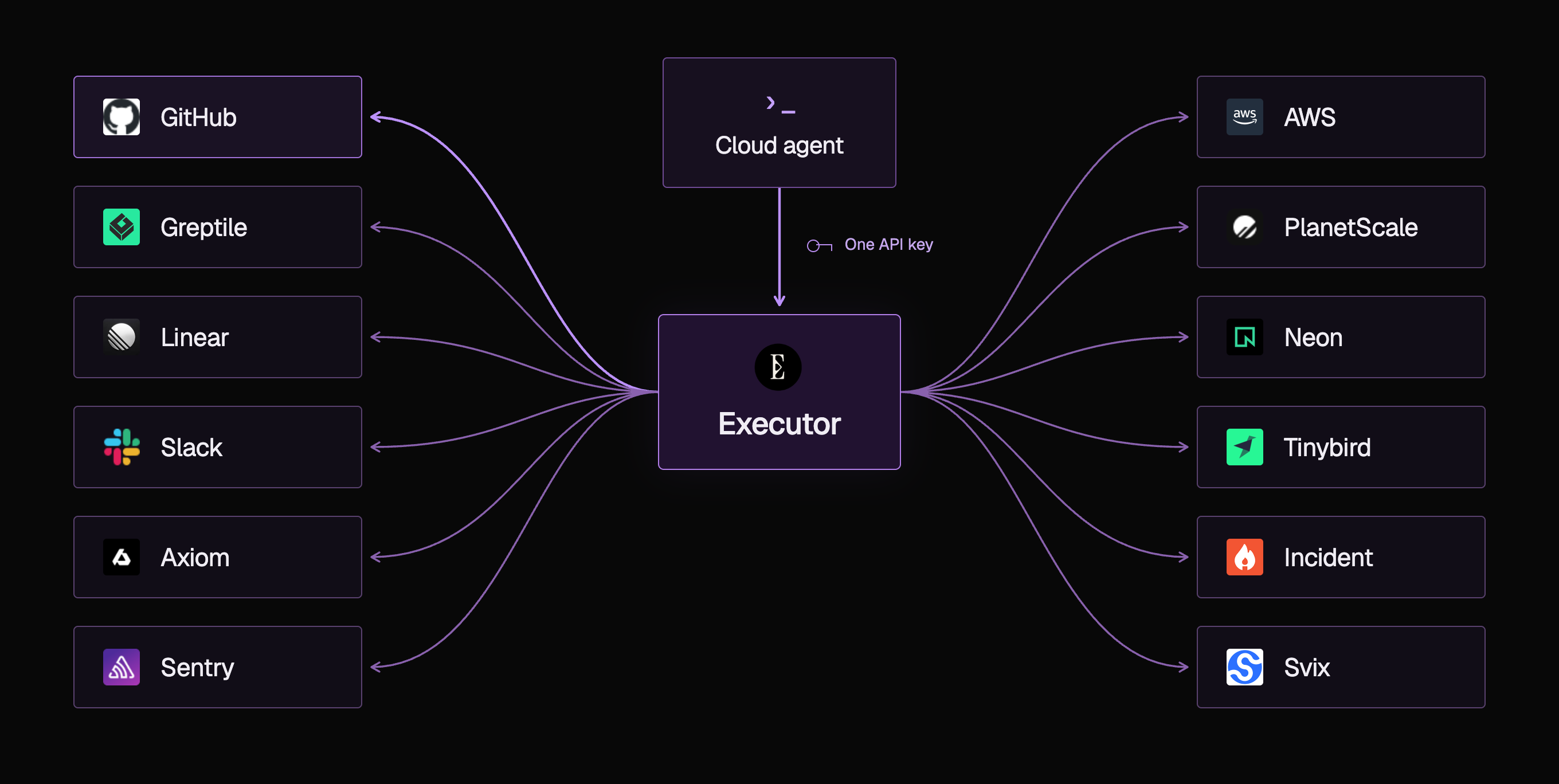
To give cloud agents access to the various services that we use (which has slowly built up over time), we use a tool called Executor. The idea here is that you only need to go through OAuth once per service. Executor then stores those credentials in the cloud, so all you need to give your agent is a single API key to access the tools you've connected. Here's what our setup looks like:
Going one step further, Infisical has been a huge help as well. Rather than having to define a whole list of env variables on the cloud agent's platform, all we need to do is create a machine identity and grant it access to the various dev services it needs (Stripe, Tinybird, etc.), leaving us with a single env variable on the cloud agent platform. This, alongside Executor, has been insanely helpful in letting us easily test out the various cloud agent platforms (Cursor, Devin, Capy, etc.) and learn which one we like the best.
I do think this is quite important because various platforms cater to different styles. For instance, we use Capy pretty heavily through Slack, whereas personally I like Cursor a lot for the seamlessness between local and cloud coding.
Teaching the agent how to query and use these systems
Giving agents access to these tools is just half the battle. The other half is actually teaching the agents how to use them. Now, it could be argued that models are getting smart enough to figure this out by themselves. But in my experience, well-written skills make a pretty big difference to how often agents get things right.
I wrote a pretty detailed blog here on how we enable our agents to query Axiom and AWS when investigating support issues. The TLDR is that teaching the agent the structure of our logs and infra meant that:
- It wouldn't have to make unnecessary calls each time it needs to interact with these services to discover this structure
- There's a much lower chance of the agent hallucinating a core detail about the service, which could snowball and derail the entire task
On top of that, I've seen multiple agent platforms hallucinate when trying to piece together our architecture themselves (e.g. flagging issues with a service we no longer even use).
Walking through a cloud agent from start to finish
With all these pieces in place, I'd like to round things off by walking through how one of our cloud agents runs from start to finish, and how we use our /tdd skill to basically "orchestrate" the various steps in its workflow. To kick things off, we'd start by pasting the following into Cursor or Capy:
please /tdd https://autumnpricing.slack.com/archives/C7F3B9A2LM/p1746284917358026Step 1: Initialize environment and tools. On startup, the agent first spins up the various local services it needs through a docker compose file. It then pulls the secrets it needs for external dev services through Infisical, and finally connects to the MCP tools using Executor.
Step 2: Gather the necessary context. The next step is to gather all the necessary context to either ship the feature or bug fix. To do this, the agent usually first reads Slack to get a baseline understanding of what's going on. From there, it might choose any one of the available tools to get further context. For instance, if it's a bug, it would usually query Axiom (using the /investigate skill) to learn where it came from.
Step 3: Writing the test. With the right context, the agent then begins the test writing process. This is what the bulk of our /tdd skill focuses on. At a high level, there are two "modes" the agent can take:
- Bug fixes: the agent writes a test that reproduces the bug and confirms that it fails for the right reason. From there, it implements the fix and runs the test again to make sure it passes.
- New features: the agent does research on our codebase and begins mapping out the various behaviors and edge cases it needs to verify for the feature that is being implemented. It then writes a test for each one. After the implementation is done, it ensures all of the new tests written have passed.
Step 4: Verifying nothing broke. Finally, in order to verify that we haven't caused any regressions, the agent will then run both the core suite of tests, alongside any other test groups that are relevant to the changes it made, using the parallel test infrastructure we described earlier.
And just like that, we're a step closer to building our software factory.