For most companies, building an API is becoming more and more important. With harnesses like Claude Code becoming the primary way users interact with applications, APIs are essentially the new "dashboard".
We've always been an API-first product, but over the past few months we've found ourselves designing it very differently as we imagine agents becoming the primary consumer. We're making decisions that I think might conventionally be considered "bad practice" or unintuitive, and figured it'd be interesting to share some of these.
APIs are the new frontend
Agents interact with applications very differently from humans. They don't see a dashboard, click through buttons, or navigate the user journeys you so thoughtfully designed. They simply read and call your API. So increasingly, we're starting to think about how to design user flows and product from a backend perspective.
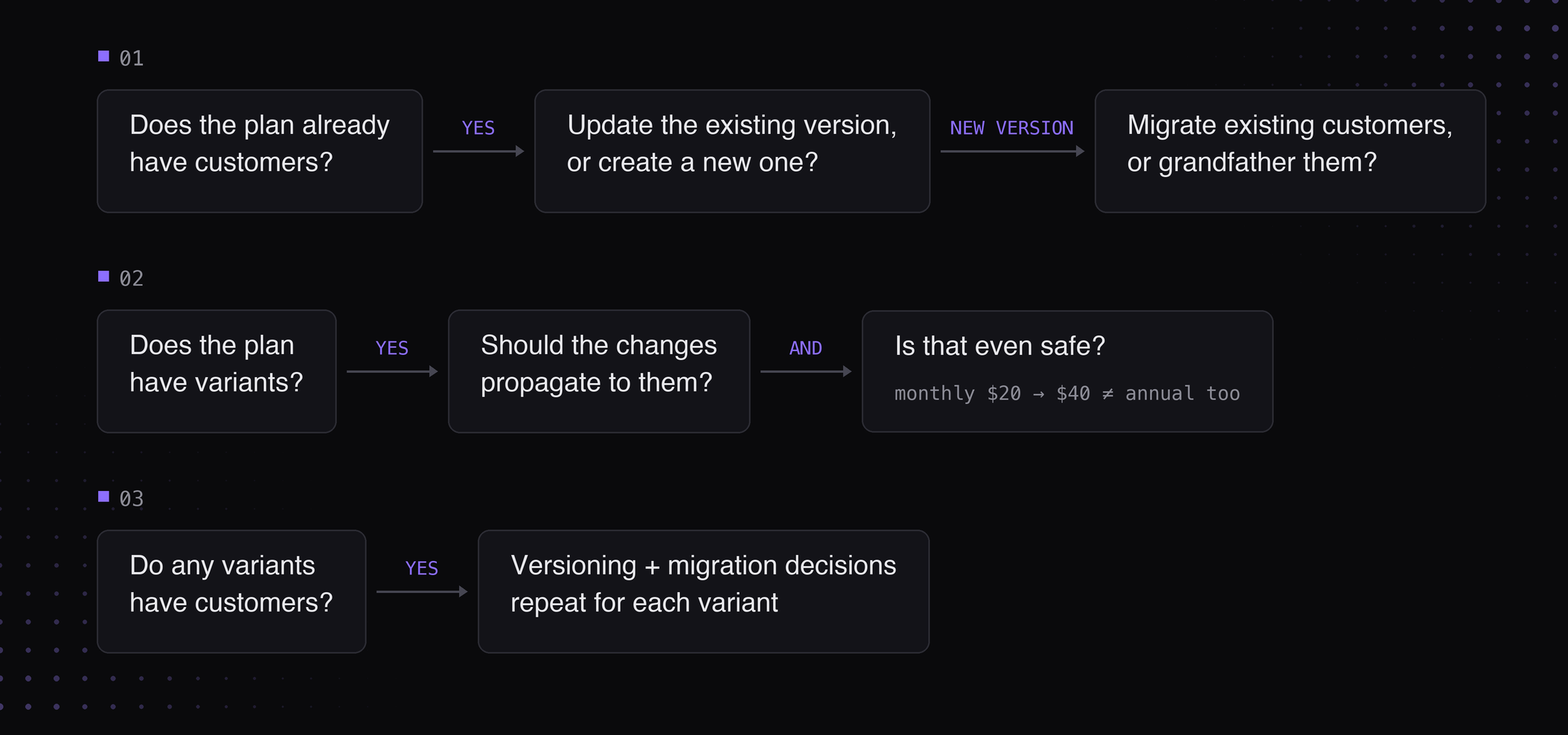
For example, updating a plan in Autumn is a surprisingly complex workflow because each decision depends on the current state of your pricing model and there are many branches. A simplified version of the decision tree looks something like this:
Traditionally, all of this logic has been encoded into a multi-step form in the UI that looks something like this:
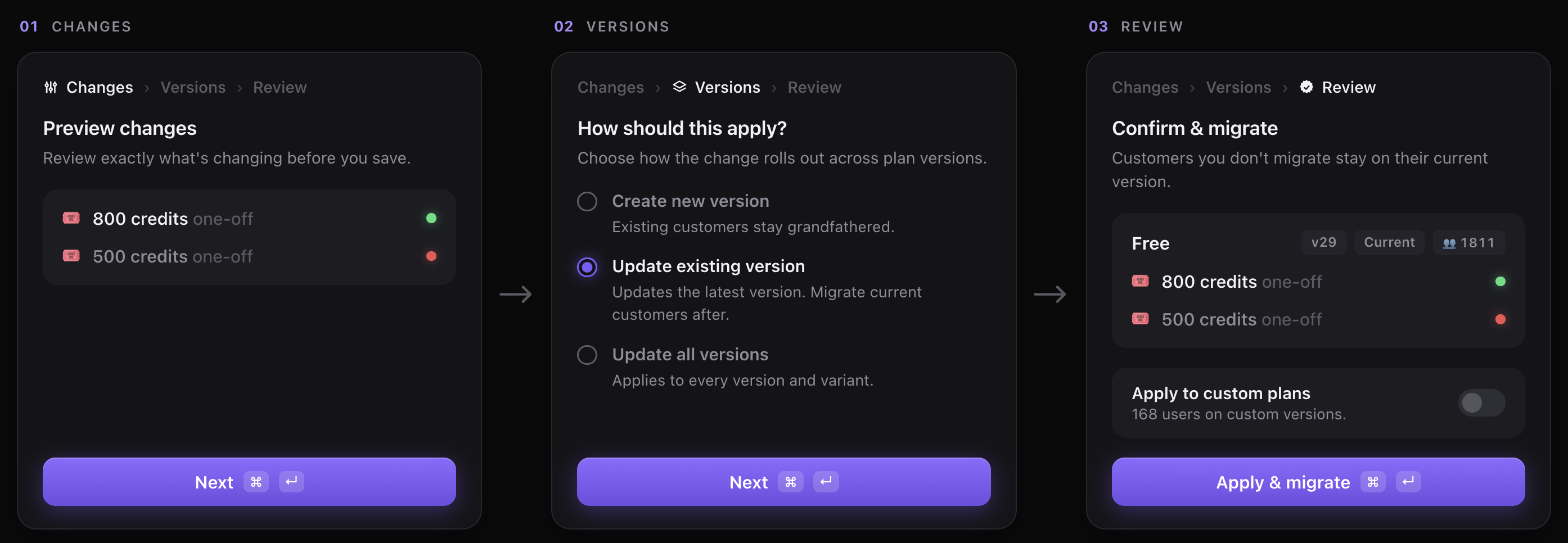
So now the question is: how do we design this for an agent? Or rather, what do these "flows" look like when encoding it into an API? For us, we did two things:
1. Baking in "decisional" logic into our API endpoints
Firstly, we moved all of the decision-making onto the backend. Instead of expecting the agent to infer what actions are valid, we expose them explicitly through catalog.preview_update.
For example, the endpoint returns fields like has_customers, can_version, and variants, allowing the agent to understand the current state of the pricing model and the decisions that need to be surfaced to the user.
Whether that's our own harness or Claude Code, the prompting becomes much simpler because the agent no longer has to reason about the workflow itself — it just follows the decision tree we've already computed.
2. Unifying functionality into a single endpoint for the agent
The second thing we changed was making these endpoints much broader than we usually would. Rather than separate endpoints like /features.update and /plans.update, we exposed a catalog.update endpoint that lets an agent update your entire pricing in one go.
Generally, good API design prefers smaller, resource-oriented APIs because it's intuitive for humans. Agents, however, work better when they have all the context up front, because they're able to reason over the pricing model in one pass, without having to "discover" it through a series of calls. We also get to save on latency :)
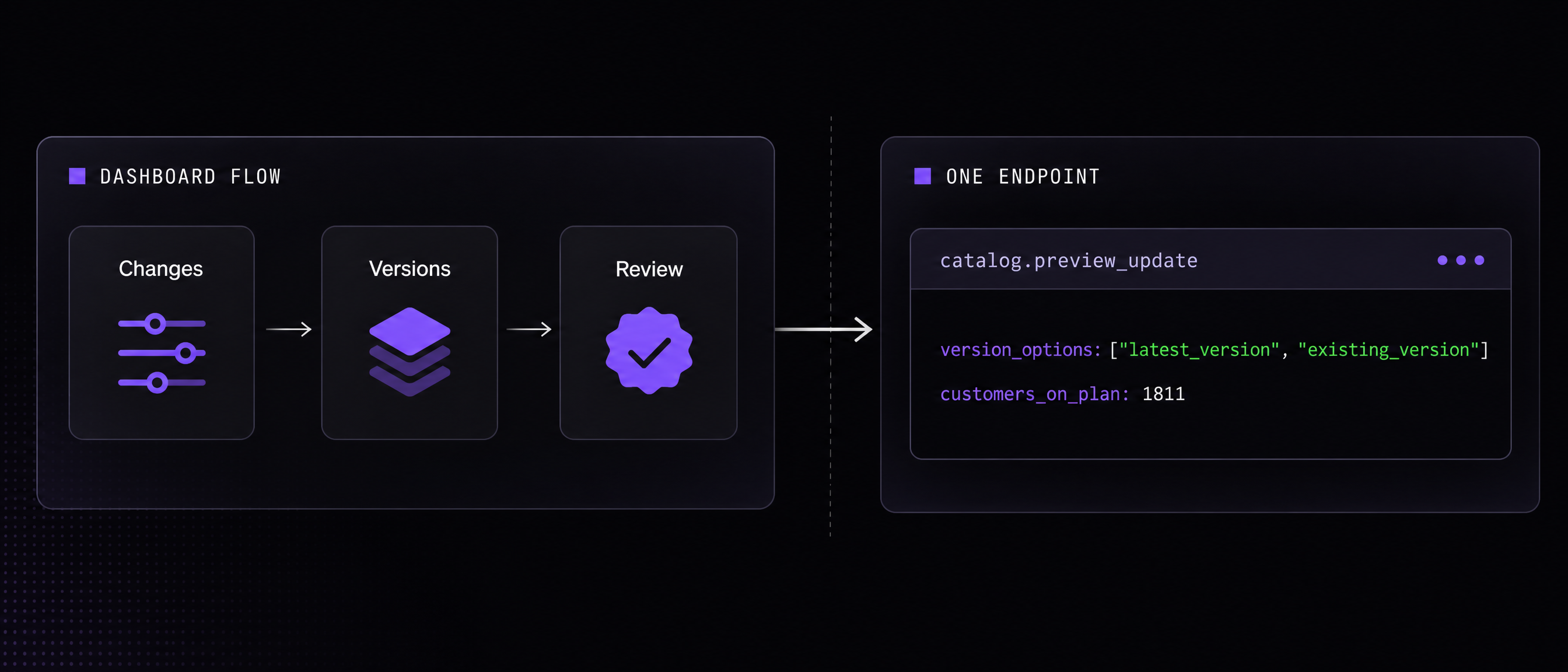
Basically, catalog.preview_update and catalog.update compress what used to be a complex, multi-step dashboard workflow into a form factor that's much more accessible for agents. We've been testing this across our internal harness, and it's worked surprisingly well.
APIs as a source of truth (the modality sprawl)
Another problem we ran into was modality sprawl. For any workflow, we had to support it on several different interfaces:
- Dashboard
- Internal agent
- CLI
Take the previous "update plan" flow for instance. That complex multi-step workflow needed to be built for each of these modalities.
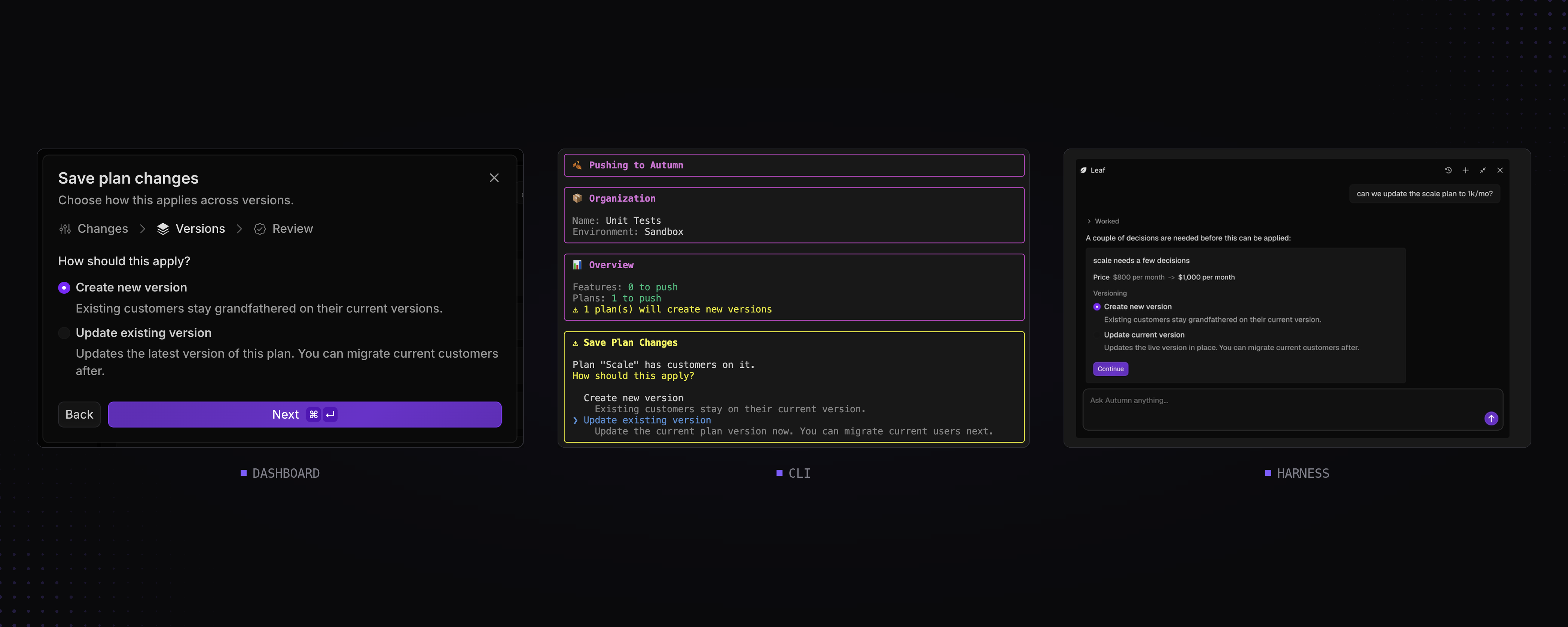
The issue with the way we originally built things was that each of these modalities owned parts of the logic for the workflow (like computing whether a plan can be versioned, and so on). And so whenever we added something new, such as variants, we found ourselves designing the same flow many times.
The fix was the same one we described earlier: move the workflow and all of its logic into the API. Instead of each interface implementing its own version of the flow, they all consume the same decision tree. The dashboard, CLI, and agents became thin wrappers over the same backend logic.
Implementing preview endpoints
The last pattern we've found to be pretty helpful is pairing most write endpoints with a corresponding preview endpoint.
This originally had nothing to do with building for agents. In billing, users need to understand in full detail what the result of an action will be before committing to it: how much will be charged, which subscriptions will change, whether customers will be migrated, and so on. Since our users also needed to surface this information to their customers, these preview endpoints naturally became API-first. For example, here's the UI we show in our dashboard before you change a user's plan:
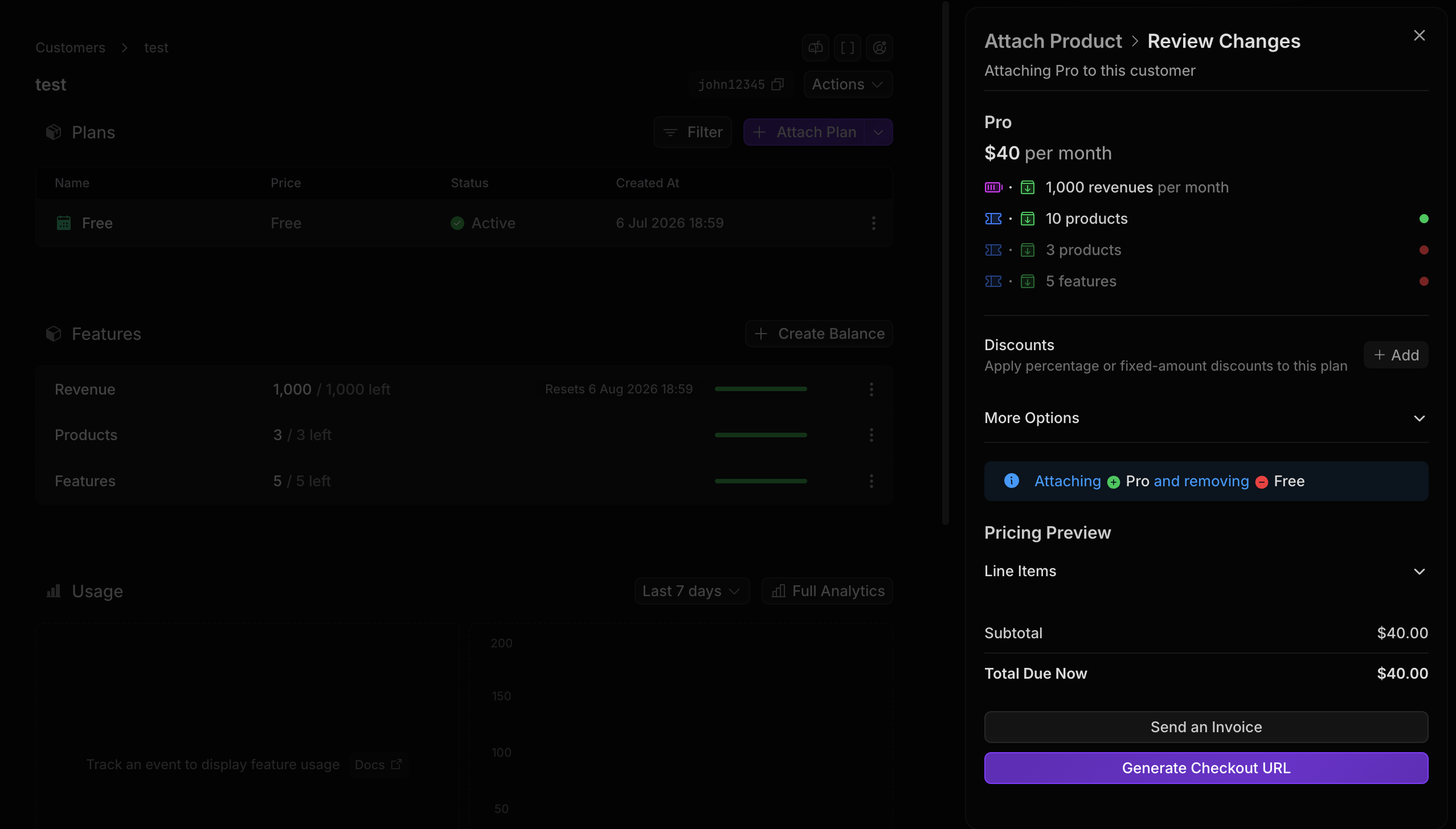
Incidentally, this ended up translating surprisingly well to agents. When we built our Slack agent for provisioning invoices and enterprise contracts, most of the work around guardrails was already done. The agent simply called the preview endpoint, surfaced the results to the user, and only executed the write once everything had been confirmed.
After seeing how well that worked, we started applying the same pattern elsewhere. catalog.preview_update, for example, gives an agent everything it needs to understand a catalog change (plans and features) before calling catalog.update.
I think treating preview functionality as a first-class citizen is extremely important when building for agents. These agents are ultimately a proxy for your dashboard, and they're only able to surface what they're able to retrieve.
Final thoughts
It's been really interesting to see the patterns for good AX start to diverge from good DX as the way we interact with agents evolves.
Just last year, agents weren't very good at managing huge amounts of context, so they interacted with APIs much more like humans did: multi-step, coordinated, and fairly structured. Today though, they're much more autonomous, long-running, and free-form, which I think calls for a different way of thinking about how we build APIs.
I think we're going to start seeing some really interesting patterns emerge as people try to take advantage of this.